

The shift to WCAG 3.0
The Web Content Accessibility Guidelines (WCAG) are undergoing a significant evolution with version 3.0, slated for implementation in 2026. This isn’t a minor update; it represents a fundamental shift in how we approach web accessibility. While WCAG 2.x focused on making content perceivable, operable, understandable, and robust, WCAG 3.0 aims to build upon those foundations with a more holistic and user-centered approach.
One of the biggest changes is the move away from discrete "success criteria’ to broader ‘conformance requirements.’ This means demonstrating accessibility isn"t about ticking boxes, but about ensuring a genuinely accessible experience for all users. Three key areas are driving this change: improved accessibility API support, a heightened focus on cognitive accessibility, and greater emphasis on user customization. Developers should start paying attention now, even with the 2026 rollout date, because the underlying principles demand a shift in mindset and development practices.
I see this as a positive step. WCAG 2.x, while impactful, sometimes felt overly prescriptive. The new conformance requirements encourage a deeper understanding of accessibility needs and more creative solutions. This will require developers to move beyond simply following guidelines and start thinking critically about the experiences they’re creating. It’s a shift from compliance to genuine inclusivity.
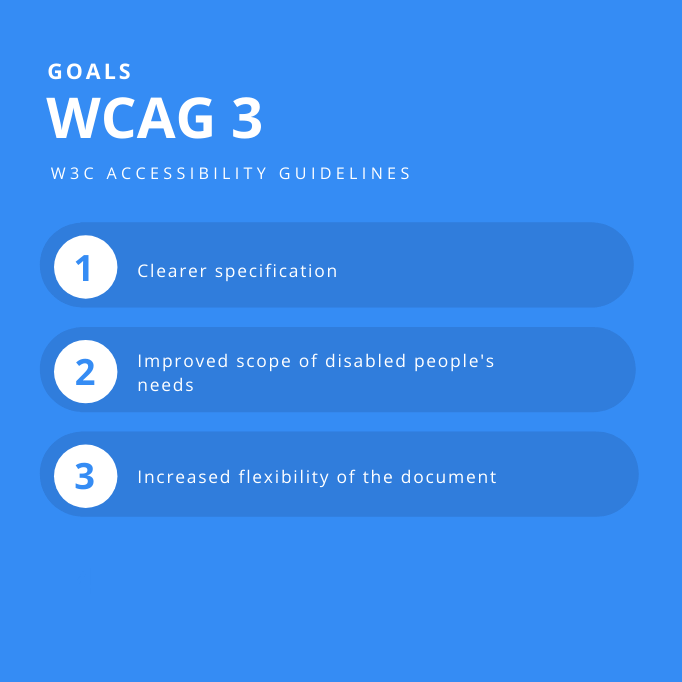
The WCAG Working Group is prioritizing clarity and flexibility. They understand that technology evolves rapidly, and the guidelines need to be adaptable. This is why the focus on underlying principles – ensuring experiences are usable by people with a wide range of abilities and using a variety of assistive technologies – is so important.
Prioritizing native APIs over ARIA
The new guidelines prioritize native accessibility APIs. For a long time, we've used ARIA to patch holes in semantic HTML, but ARIA is easy to break. WCAG 3.0 pushes us back toward the browser's built-in tools because they are more stable.
The problem with over-reliance on ARIA is that it can create a fragile accessibility layer that breaks easily. Native accessibility APIs, when used correctly, provide a more robust and reliable experience. Semantic HTML – using elements like ``, ``, ``, and `` appropriately – is the foundation. These elements inherently convey meaning to assistive technologies through the platform's accessibility APIs.
To test whether your components are correctly exposing information to accessibility APIs, you can use browser developer tools. Most browsers have accessibility inspectors that allow you to view the accessibility tree. You should verify that elements are properly labeled, that roles are correctly assigned, and that relationships between elements are accurately represented. It is important to test with a variety of browsers and operating systems, as API implementations can vary.
Designing for cognitive differences
WCAG 3.0 finally addresses cognitive accessibility. Accessibility isn't just about screen readers or keyboard navigation; it's about making sure people with memory issues or learning disabilities can use your site. This group has been ignored for too long.
The guidelines related to cognitive accessibility focus on making content easier to understand and navigate. This includes simplifying language, providing clear instructions, and reducing distractions. Avoiding jargon and complex sentence structures is vital. Consistent navigation and a clear visual hierarchy are also critical. Think about breaking down large blocks of text into smaller, more manageable chunks.
Here are some concrete examples: use plain language instead of technical terms, provide alternative text for images that explains the purpose of the image, offer consistent navigation throughout the site, avoid flashing or moving content that could be distracting, and allow users to pause or stop animations. Reducing time limits is also important, as it gives people with cognitive differences more time to process information.
I believe this shift is essential. For too long, web accessibility has been narrowly focused on specific disabilities. WCAG 3.0 acknowledges that everyone benefits from clear, simple, and well-organized content. It’s about creating a more inclusive web for all users.
- Write in plain language to avoid confusing users.
- Provide alternative text for images
- Offer consistent navigation
- Avoid distracting content
- Allow users to pause animations
- Reduce time limits
Customization & User Control
WCAG 3.0 places a strong emphasis on user control over their web experience. This means allowing users to customize things like font size, colors, and spacing to meet their individual needs. It’s about empowering users to create an environment that works best for them.
Responsive design is crucial for customization. Websites should adapt seamlessly to different screen sizes and devices, and they should also allow users to adjust the layout and appearance of content. This includes supporting different color schemes, font sizes, and text spacing. The goal is to avoid forcing users to conform to a single, inflexible design.
Browser extensions and user agents play a significant role in providing accessibility features. Many users rely on these tools to customize their browsing experience. Websites should be designed to work well with these tools, rather than interfering with them. Avoid using techniques that override user preferences or break accessibility features.
Conformance Requirements: A Shift in Thinking
The move from success criteria to conformance requirements in WCAG 3.0 is a subtle but significant change. In WCAG 2.x, you could demonstrate accessibility by meeting a specific set of criteria. In WCAG 3.0, you need to demonstrate that your website provides an accessible experience overall.
This change affects testing and evaluation. It’s no longer enough to simply check off a list of individual criteria. You need to consider how all the elements of your website work together to create an accessible experience. This requires a more holistic approach, focusing on the user journey and the overall usability of the site.
Meeting these requirements may require more than just technical fixes. It may also involve changes to design, content, and development processes. It's about embedding accessibility into the entire web development lifecycle. This is where things get tricky, and developers need to embrace the underlying philosophy of inclusivity.
Testing beyond automation
Existing accessibility testing tools, such as axe DevTools, WAVE, and Lighthouse, will need to adapt to the new conformance requirements of WCAG 3.0. While these tools are valuable for identifying common accessibility issues, they are not a substitute for manual testing and user testing with people with disabilities. I anticipate updates to these tools as the 2026 implementation date approaches.
You still need to test manually. Use a screen reader yourself, but more importantly, hire people with disabilities to test your site. They will find barriers that an automated scan will never see.
Interpreting test results can be challenging. Automated tools often generate false positives and false negatives. It’s important to understand the limitations of these tools and to use your judgment when evaluating the results. Prioritize fixes based on the severity of the issue and the impact on users. Don't chase every single error; focus on the ones that have the biggest impact.
Accessibility Testing Tool Comparison
| Ease of Use | Coverage (Automated Checks) | Reporting Quality | Integration with Dev Workflow |
|---|---|---|---|
| High - Beginner Friendly | Medium - Good Baseline | Medium - Clear, Actionable | High - Browser Extensions Available |
| Medium - Requires Some Training | High - Comprehensive | High - Detailed, Technical | Medium - Command Line & API Access |
| Medium - Integrated into DevTools | Medium - Focus on Performance & Accessibility | Medium - Concise, Developer-Focused | High - Native to Chrome DevTools |
| Low - Requires Screen Reader Expertise | Low - Manual Testing Focus | High - In-depth, User Perspective | Low - Primarily Manual Process |
| Medium - Good for Quick Checks | Medium - Identifies Common Issues | Medium - Visual Representation of Errors | Medium - Browser Extension |
| High - Simple Interface | Low - Limited Automated Checks | Low - Basic Error Reporting | Medium - Browser Extension |
Qualitative comparison based on the article research brief. Confirm current product details in the official docs before making implementation choices.


No comments yet. Be the first to share your thoughts!