
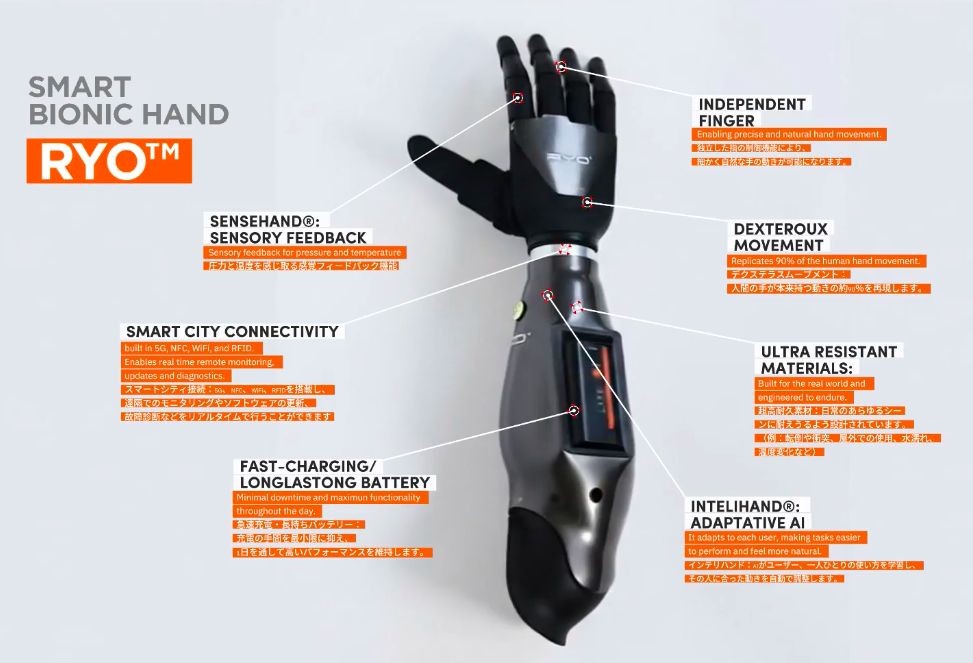

Assistive Technology Budget Fit
Assistive technology spans everything from free software to specialized hardware, but the cost varies wildly depending on who needs it and why. For many users, the goal is finding tools that fit both their daily workflow and their financial reality. This section breaks down the realistic tradeoffs between price, age, and condition so you can make a practical choice.
Software vs. Hardware Costs
The most immediate budget win is software. Many operating systems include built-in accessibility features that cost nothing. macOS VoiceOver, Windows Narrator, and Android’s TalkBack are fully functional screen readers available out of the box. If your needs are basic, start here before buying anything.
When you move to dedicated hardware, prices rise. A standard Bluetooth keyboard might cost $20, while a one-handed ergonomic model can jump to $100 or more. Speech-to-text hardware, like dedicated dictation devices, often sits in the $200–$500 range. The key is to identify the specific bottleneck—typing speed, visual access, or motor control—and buy only the tool that solves it.
New vs. refurbished choices that change the plan
Buying new offers warranty coverage and the latest battery technology, which is critical for mobility. However, the assistive tech market has a robust refurbished sector. Many major manufacturers certify used devices, testing them for functionality and replacing worn parts. This can cut costs by 30–50% without sacrificing reliability.
Check the warranty terms carefully. A refurbished device with a 90-day warranty is a safer bet than a used one sold "as-is." For high-frequency use, like a daily driver keyboard, the extra cost of new may be worth the peace of mind. For secondary tools or testing purposes, refurbished is often the smarter fiscal move.
Age and Obsolescence
Technology ages quickly. A screen reader that was state-of-the-art three years ago may lack support for newer operating system updates or accessibility standards. When budgeting, consider the total cost of ownership. A cheaper, older device might require frequent replacements or incompatibility workarounds that cost more in time and frustration.
Prioritize devices that receive regular software updates. This extends the usable life of the hardware and ensures it remains compatible with evolving digital environments. Avoid niche, proprietary systems that are unlikely to be supported long-term, as they can become expensive dead ends.


As an Amazon Associate, we may earn from qualifying purchases.
Finding Funding and Support
For students, assistive technology can be part of an IEP (Individualized Education Program). Schools often cover the cost of devices deemed necessary for educational access. This is a critical resource to explore early, as it can significantly reduce out-of-pocket expenses.
For adults, check with insurance providers or vocational rehabilitation agencies. Some plans cover assistive tech if it is prescribed by a doctor or occupational therapist. These programs can offset the cost of expensive hardware, making high-quality tools more accessible.
Shortlist real options
The AI Revolution in Assistive Technology troubleshooting should start with a clear boundary: what is actually broken, and what still works normally. Check the display, network connection, paired devices, app access, and recent updates before assuming the whole system needs a reset. A small connection failure can make the main screen feel unreliable even when the core system is fine. Work from low-risk checks to deeper resets. Confirm power state, safe parking, account access, and signal first. Then restart the interface, wait for it to reload completely, and test the original symptom. Avoid changing multiple settings at once because that makes it harder to know which step actually fixed the problem. If the issue affects safety information, repeats after every restart, or appears with warning messages, treat the reset as a temporary diagnostic step rather than the final fix. Document the symptom and move to official support instead of stacking more DIY attempts.
| Factor | What to check | Why it matters |
|---|---|---|
| Fit | Match the option to the primary use case. | A good deal still fails if it does not fit the job. |
| Condition | Verify age, wear, and service history. | Hidden condition issues erase upfront savings. |
| Cost | Compare purchase price with likely upkeep. | The cheapest option is not always the lowest-cost option. |
Inspect the expensive parts
Before committing to a purchase, look closely at the components most likely to fail. Assistive technology often carries a high sticker price, making warranty coverage and repair logistics critical. A single broken screen or unresponsive microphone can render the device useless until serviced, disrupting daily routines.
Start by checking the physical build. For one-handed keyboards and styluses, test the durability of the mounting brackets and charging contacts. These connection points endure constant friction and are common failure points. Look for devices with replaceable keycaps or modular parts that can be swapped without professional repair.
Next, review the software support and warranty terms. AI-driven tools like screen readers rely on continuous updates. Ensure the manufacturer promises long-term software maintenance, not just a one-time purchase. Verify if the warranty covers accidental damage, as drops and spills are frequent in assistive tech use.
Finally, consider the total cost of ownership. Some devices require proprietary accessories, such as specialized charging docks or mounting arms, which can add significant cost. Compare the price of these necessary add-ons against the device itself to avoid unexpected expenses later.
Plan for ownership costs
The sticker price of assistive technology is often just the entry fee. Screen readers, speech-to-text software, and durable one-handed keyboards carry recurring costs that can quietly inflate the total price of ownership over three to five years. If you buy a cheap device without checking these hidden expenses, that bargain can stop being cheap very quickly.
Software subscriptions are the most common surprise. Many premium screen readers and specialized dictation engines shift to annual or monthly billing after the first year. A one-time purchase license might look attractive initially, but if it doesn't include future updates or cloud-based speech recognition improvements, you may end up paying double: once for the legacy software and again for a modern cloud service. Always check whether the core functionality requires a recurring subscription or if offline features are sufficient for your needs.
Hardware maintenance is the second major cost driver. One-handed keyboards and ergonomic mice are subject to heavy, repetitive use. Key switches wear out, batteries degrade, and connectivity modules fail. Unlike a standard laptop, these devices are often niche products with limited manufacturer support. If the warranty expires and the company no longer stocks replacement batteries or keycaps, the entire unit may become e-waste. Factor in the cost of replacement peripherals every two to three years.
Finally, consider the cost of integration and training. Assistive technology rarely works out of the box with perfect accuracy. You may need to invest in professional setup services, customized configuration, or ongoing technical support. For students, this might mean coordinating with an IEP team for software licensing; for professionals, it could mean paying for IT support to integrate dictation tools with enterprise security protocols. A $50 tool that saves hours of work is a bargain; a $50 tool that requires $200 in setup fees is a liability.
Assistive technology: what to check next
Assistive technology (AT) covers the hardware, software, and services that help people work around disabilities. Under the Individuals with Disabilities Education Act (IDEA), AT is not a single device but a category of tools. These tools can be low-tech, like pencil grips, or high-tech, like screen readers and AI-driven speech-to-text engines.
What is assistive technology on an IEP? When listed on an Individualized Education Program (IEP), assistive technology refers to specific devices or services required for a student to access their education. The IEP team determines if a tool is necessary for the student to make progress on academic goals. This can include AAC devices, specialized keyboards, or software that converts text to speech.
Does insurance cover assistive technology? Coverage varies widely. Private health insurance often covers durable medical equipment like hearing aids or voice recognition software if deemed medically necessary. Medicare may cover certain items, but many specialized tools for education or daily living are excluded. Medicaid has different rules by state, and some programs offer grants through the Administration for Community Living to help cover costs.
How do I choose the right tool? Start with the specific task you want to accomplish. For reading, evaluate screen readers like JAWS or VoiceOver based on your operating system. For typing, test one-handed keyboards like the Kinesis Freedom or ergonomic layouts. AI-powered tools like Otter.ai or Google Live Transcribe offer different strengths in accuracy and speed. Trial periods are essential before committing to a purchase.
No comments yet. Be the first to share your thoughts!