

What makes assistive technology work
Assistive technology (AT) encompasses the hardware, software, and services that help people with disabilities perform tasks they might otherwise find difficult or impossible. The Assistive Technology Industry Association (ATIA) defines it broadly to include any item or system used to increase functional capabilities, while the World Health Organization includes the services required for selection and implementation. This ecosystem ranges from simple ergonomic tools to complex AI-driven software, all aimed at promoting independence.
Effective AT solutions typically integrate hardware and software. Hardware includes physical devices like ergonomic keyboards, trackballs, or braille displays. Software includes applications such as screen readers (e.g., JAWS, NVDA) and speech-to-text engines (e.g., Dragon NaturallySpeaking). The most robust workflows combine these elements, ensuring that specialized input devices interface seamlessly with adaptive software to remove digital barriers.
Best screen readers for desktop and mobile
Screen readers convert digital text and interface elements into synthesized speech or braille, enabling users with visual impairments to navigate operating systems and web content. Selection depends on the operating system, budget, and specific needs like braille support or voice quality.
JAWS (Job Access With Speech)
JAWS is the industry standard for Windows, widely used in corporate and educational settings. It offers deep integration with Windows applications and extensive customization for reading speed, voice pitch, and keyboard shortcuts. While it requires a paid license, its reliability and feature set make it a staple for power users managing complex workflows.
NVDA (NonVisual Desktop Access)
NVDA is a free, open-source screen reader for Windows. It has gained significant popularity due to its accessibility and active community development. NVDA supports a wide range of applications and often matches the functionality of paid alternatives. Its lightweight nature allows it to run efficiently on older hardware, making it an ideal choice for students and budget-conscious users.
VoiceOver
Pre-installed on all Apple devices, VoiceOver provides a seamless experience within the Apple ecosystem. It is tightly integrated with macOS, iOS, and iPadOS, ensuring consistent navigation across iPhones, iPads, Macs, and Apple Watches. The voice synthesis quality is high, and its gesture-based controls are intuitive for users familiar with Apple’s design language.
TalkBack
TalkBack is the built-in screen reader for Android devices. It offers various gestures and voice feedback options, allowing users to navigate apps and read notifications without visual cues. While it may lack some advanced customization features found in desktop alternatives, its full integration into the Android OS ensures broad compatibility with apps and services.
Braille Support and Hardware
For users who prefer tactile feedback, screen readers often pair with refreshable braille displays. These devices convert digital text into raised dots that can be read by touch. Both JAWS and NVDA offer strong support for major braille display manufacturers. When selecting a screen reader, verify compatibility with your specific braille display model to ensure a smooth reading experience.


As an Amazon Associate, we may earn from qualifying purchases.
Comparing Screen Reader Options
The table below compares popular screen readers based on platform, cost, and ideal use cases.
| Screen Reader | Primary Platform | Cost | Best For |
|---|---|---|---|
| JAWS | Windows | Paid | Corporate and advanced users |
| NVDA | Windows | Free | Budget-conscious users |
| VoiceOver | macOS, iOS | Free (built-in) | Apple ecosystem users |
| TalkBack | Android | Free (built-in) | Android mobile users |
Top speech-to-text software for dictation
Speech-to-text software converts spoken words into written text in real time. For assistive technology users, the choice of software impacts accuracy, privacy, and workflow efficiency. Unlike simple voice commands, dictation tools allow for continuous writing in documents, emails, and code editors.
Dragon Professional
Dragon Professional, developed by Nuance (now part of Microsoft), is the industry standard for dedicated dictation. It uses advanced acoustic modeling to achieve high accuracy across various accents. The software adapts to the user's voice over time, reducing the need for corrections. It integrates with Microsoft Word, Outlook, and most Windows applications. The "Speak and Type" feature allows dictation anywhere on the screen, and custom vocabulary support enables instant recognition of technical terms and names.
Google Voice Typing
Google Voice Typing is a free feature available in Google Docs, Gmail, and Android. It leverages Google’s cloud-based speech recognition models, providing excellent accuracy for standard English and many other languages. It requires an internet connection as processing occurs on Google’s servers. Accessible via a microphone icon in Google Docs or system-wide on Android, it supports multiple languages and automatic switching. While it lacks the deep customization of Dragon, its zero cost makes it practical for quick drafting.
Apple Dictation
Apple Dictation is integrated into macOS, iOS, and iPadOS. It provides a seamless voice-to-text experience for Apple users. Like Google’s tool, it relies on cloud processing for standard accuracy but offers a private cloud option for supported languages, keeping data on Apple’s secure servers. Users can enable it in System Settings. For offline use, language packs can be downloaded, though accuracy may be slightly lower than cloud-based processing.
Windows Speech Recognition
Windows Speech Recognition is a built-in tool in Windows 10 and 11. It serves a dual purpose: dictating text into any application and controlling the computer through voice commands. This makes it useful for users needing both input and navigation assistance. While accuracy has improved, it still requires more training and correction than dedicated tools like Dragon. It works offline, which is a significant advantage for privacy-conscious users, though it lacks the professional-grade accuracy needed for heavy dictation work.
Recommended Microphones
Audio quality significantly impacts speech-to-text accuracy. A good microphone reduces background noise and captures clear vocal tones. Below are recommended microphones for dictation software.


As an Amazon Associate, we may earn from qualifying purchases.
How to choose the right assistive technology
Selecting assistive technology requires matching specific functional needs with practical constraints. The goal is to find tools that reduce friction in daily tasks without creating new barriers through complexity or cost.
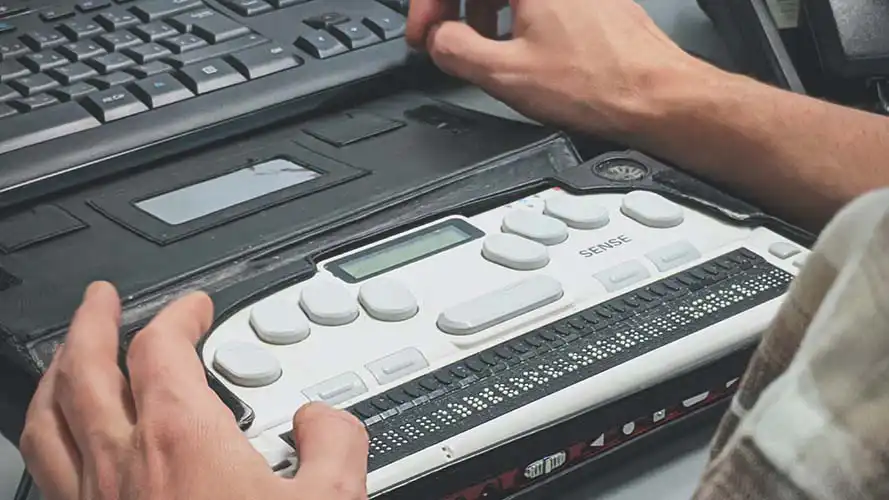
Define the primary task you need to accomplish. If you rely on screen readers, prioritize software like JAWS, NVDA, or VoiceOver that offers precise cursor control and accurate text-to-speech output. For speech-to-text needs, evaluate tools like Dragon NaturallySpeaking for dictation accuracy or built-in accessibility features in your operating system. Consider whether you need hardware aids, such as braille displays or alternative input devices, to complement software solutions.
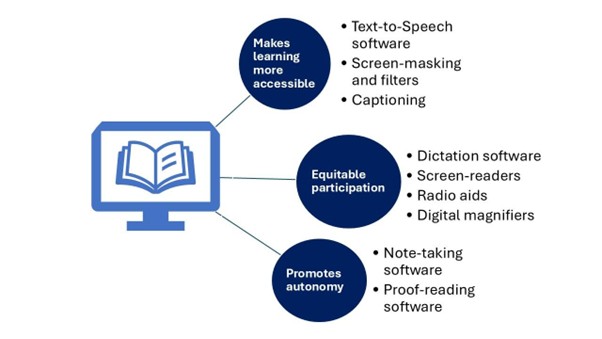
Assistive technology ranges from free open-source options to expensive specialized hardware. Begin with built-in accessibility features in your current operating system, which often provide robust screen reader and dictation capabilities at no additional cost. If premium features are necessary, compare the total cost of ownership, including subscription fees, maintenance, and potential training resources. Many organizations and insurance providers offer grants or loans for assistive devices, so research available financial assistance before making a purchase.
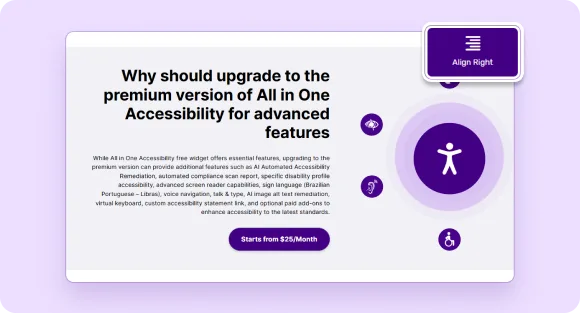
Ensure the assistive technology integrates seamlessly with your existing devices and software. Screen readers must work with your web browser, email client, and document editors. Speech-to-text software should support the applications you use most frequently. Test the technology with your current setup whenever possible, as compatibility issues can significantly impact usability. Consider future-proofing by choosing solutions that support multiple platforms or offer cross-device synchronization.
Frequently asked questions about assistive technology
Does insurance cover assistive technology? Coverage varies significantly by provider and plan. Some health insurance policies cover specific devices if deemed medically necessary, while others may exclude them. Medicare and Medicaid have specific guidelines for durable medical equipment, but many modern assistive tools, like advanced speech-to-text software, may fall outside traditional medical coverage. It is best to contact your insurer directly to understand your specific benefits before purchasing.
Is assistive technology covered under IDEA? Yes. The Individuals with Disabilities Education Act (IDEA) defines assistive technology devices and services as part of a student’s right to a free appropriate public education. Schools must evaluate students for assistive technology needs and may be required to provide devices, such as screen readers or communication aids, if they are necessary for the student to access their education.
How long does it take to learn a screen reader? Learning a screen reader like JAWS, NVDA, or VoiceOver is an ongoing process. Basic navigation and reading can be mastered in a few weeks, but becoming proficient enough to work efficiently often takes several months of consistent practice. Many users continue to learn new shortcuts and features throughout their career. Training resources are often available through the software vendors or local disability organizations.
Can I use assistive technology with my current devices? Most modern assistive technology is compatible with standard operating systems. Screen readers like NVDA are free and work well with Windows, while VoiceOver is built into Apple devices. Speech-to-text tools like Dragon NaturallySpeaking integrate with major word processors and browsers. However, compatibility with specialized industrial or legacy software should be verified with the vendor before purchase.
No comments yet. Be the first to share your thoughts!