
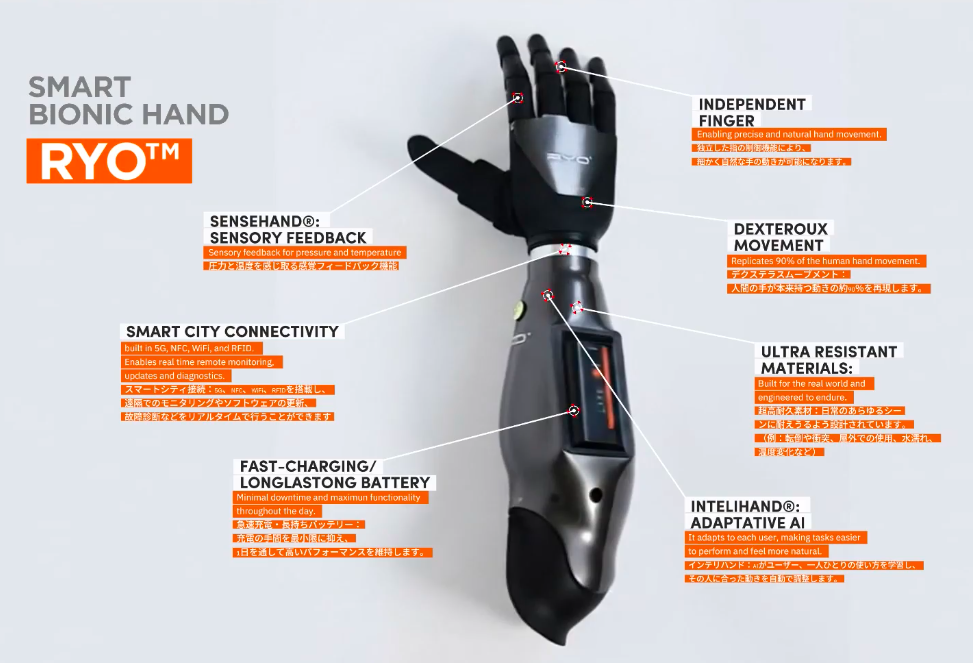

Why modern assistive technology matters
Assistive technology is no longer limited to physical hardware like hearing aids or white canes. Today, it encompasses a broad ecosystem of software programs and product systems designed to increase, maintain, or improve functional capabilities. The World Health Organization defines assistive technology as an umbrella term covering both the products themselves and the related services that help users maintain independence. This shift from purely mechanical devices to intelligent software marks a significant evolution in how we approach accessibility.
The year 2026 represents a pivotal moment for this sector, primarily due to the integration of artificial intelligence. Modern assistive tools are moving beyond basic functionality to offer predictive and adaptive support. For instance, AI-driven speech-to-text algorithms now understand context and dialects with greater accuracy, while computer vision tools can describe visual environments in real-time for visually impaired users. This intelligence allows these tools to adapt to individual needs rather than requiring users to adapt to rigid interfaces.
Assistive technology is an umbrella term for assistive products and their related systems and services. Assistive products help maintain or improve an individual's functioning and independence.
This transition to AI-driven accessibility means that assistive technology is becoming more personalized and less intrusive. Users can now rely on smart devices that learn their habits and preferences, offering assistance before it is explicitly requested. This proactive approach reduces the cognitive load on users, allowing them to focus on their tasks rather than the mechanics of using the tool. As we explore the best tools of 2026, we will see how this blend of hardware and intelligent software is redefining what is possible for people with disabilities.
For authoritative definitions and further reading on the scope of assistive technology, the Assistive Technology Industry Association (ATIA) provides comprehensive resources on how these technologies are classified and applied in daily life.
Top screen readers for visual impairment
Screen readers remain the most critical bridge between digital content and users with visual impairments. In 2026, the landscape has shifted from simple text-to-speech engines to sophisticated AI-driven assistants that understand context, navigate complex web applications, and adapt to individual learning curves. Choosing the right tool depends less on raw speed and more on how well the software integrates with your daily workflow and operating system.
The market is dominated by three primary options, each serving different needs and budgets. JAWS remains the enterprise standard for Windows environments, offering unparalleled depth for government and corporate compliance. NVDA provides a powerful, free alternative that has gained significant traction among independent users and non-profit organizations. Meanwhile, VoiceOver continues to be the seamless, built-in solution for Apple users, requiring no additional installation to function.
The following table compares the core capabilities of these leading tools to help you decide which aligns with your technical environment.
| Product | Primary Platform | Cost | 2026 AI Enhancements |
|---|---|---|---|
| JAWS | Windows | Paid (Subscription/Perpetual) | Context-aware page summarization, predictive text navigation, and deep integration with Microsoft 365 AI tools. |
| NVDA | Windows | Free (Open Source) | Basic object identification, community-driven AI add-ons for image description, and lightweight performance. |
| VoiceOver | macOS, iOS, iPadOS | Free (Built-in) | Siri integration for hands-free control, Live Listen for audio clarity, and deep accessibility shortcuts across Apple ecosystem. |
Speech-to-text software for accessibility
Speech-to-text tools have become essential for users with motor impairments or dyslexia, offering a reliable way to bypass typing difficulties. In 2026, accuracy improvements driven by advanced AI models mean these tools can now handle complex sentences and diverse accents with minimal error. This shift transforms voice input from a novelty into a primary method for writing emails, documents, and creative content.
The technology works by converting spoken words into written text in real time. For users with limited fine motor control, this reduces physical strain significantly. For those with dyslexia, it allows ideas to flow without the interruption of spelling or formatting checks. The best tools today integrate seamlessly with standard word processors and note-taking apps, ensuring that the user experience is smooth and consistent.
When selecting software, prioritize options that offer customizable voice commands and offline processing for privacy. Look for features like punctuation control and auto-correction that adapts to your specific speech patterns. Many modern platforms also provide real-time transcription for meetings, making them valuable for both personal and professional use.
To help you find the right solution, we have curated a selection of popular speech-to-text software and related hardware available on Amazon. These products range from dedicated voice recognition software to high-quality microphones that enhance accuracy.
![Dragon Professional 16.0 Speech Dictation and Voice Recognition Software [PC Download]](https://m.media-amazon.com/images/I/71wQ93kHkxL._AC_UY654_QL65_.jpg)


As an Amazon Associate, we may earn from qualifying purchases.
Accessible web design trends for 2026
Developers are moving beyond basic compliance to build websites that actively adapt to user needs. The 2026 web is less about rigid templates and more about flexible, semantic structures that assistive technologies can interpret correctly. This shift reduces the friction for users relying on screen readers, keyboard navigation, or voice commands.
At the core of this change is a renewed focus on semantic HTML. By using proper tags like <nav>, <main>, and <article>, developers provide a clear map for assistive tools. This foundation allows AI-driven features to layer on top without breaking the user experience. It is the difference between a house with labeled rooms and one with confusing, unmarked corridors.
AI is now playing a central role in filling accessibility gaps. Tools like Level Access leverage machine learning to generate accurate alt text for images and suggest keyboard shortcuts for complex interactions. These tools do not replace human judgment but handle the heavy lifting of identifying barriers that manual audits might miss.
Choosing the right assistive technology
Selecting the right assistive technology (AT) requires matching the tool to your specific needs, budget, and comfort with technology. The federal definition of assistive technology includes any item or system that helps individuals with disabilities increase, maintain, or improve their functional capabilities ECTA Center. This broad category ranges from simple adaptive utensils to complex eye-tracking software.
To find the best fit, start by identifying the specific tasks that are currently difficult. Consider whether you need help with communication, mobility, daily living, or computer access. Next, evaluate your technical proficiency. Some devices require smartphone pairing and regular software updates, while others are plug-and-play. Finally, set a realistic budget. Many tools are covered by insurance or state vocational rehabilitation programs, but out-of-pocket costs can vary widely.
Before making a purchase, ask yourself these key questions:
-
Does this tool solve my primary daily challenge?
-
Can I use it independently without constant technical support?
-
What is the total cost, including accessories and maintenance?
-
Is there a return policy if the device doesn't work for me?
Frequently asked questions about assistive technology
How much does assistive technology cost? Prices vary widely depending on the tool. Basic adaptive switches or screen readers may cost under $50, while advanced eye-tracking systems or custom prosthetics can run into the thousands. Always check if the specific assistive technology tools you need qualify for grants or insurance coverage before purchasing.
Does insurance cover assistive devices? Many health plans and Medicare Part B cover durable medical equipment like wheelchairs or walkers if prescribed by a doctor. However, coverage for newer assistive technology tools like speech-to-text software or smart home adapters is often limited. Contact your provider to verify if a specific device is considered medically necessary.
Is it hard to learn new assistive tech? Most modern devices are designed for ease of use. Tools like voice assistants or screen magnifiers often have built-in tutorials. For complex setups, organizations like the Administration for Community Living offer state-based training programs to help users adapt to new technology without frustration.
No comments yet. Be the first to share your thoughts!