
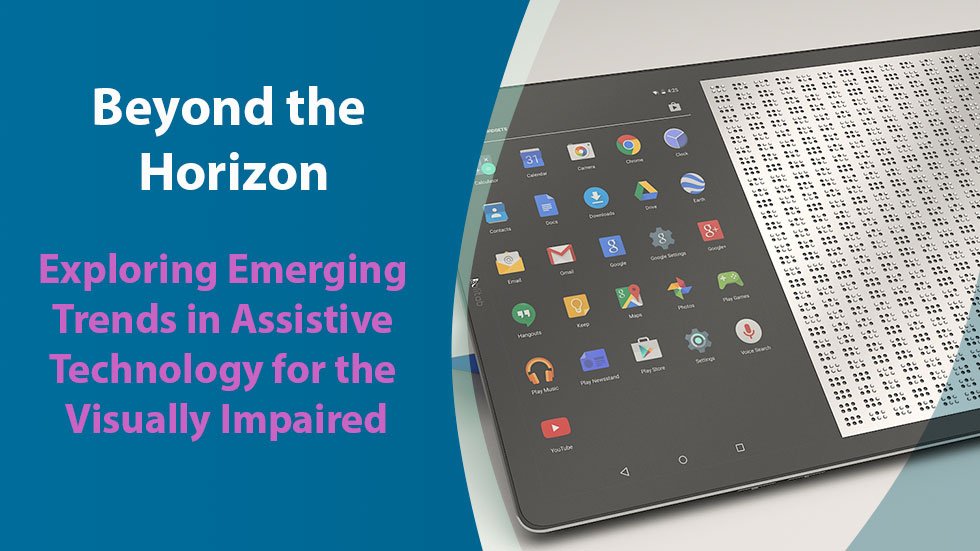

5 AI Assistive Technology Trends Shaping 2026
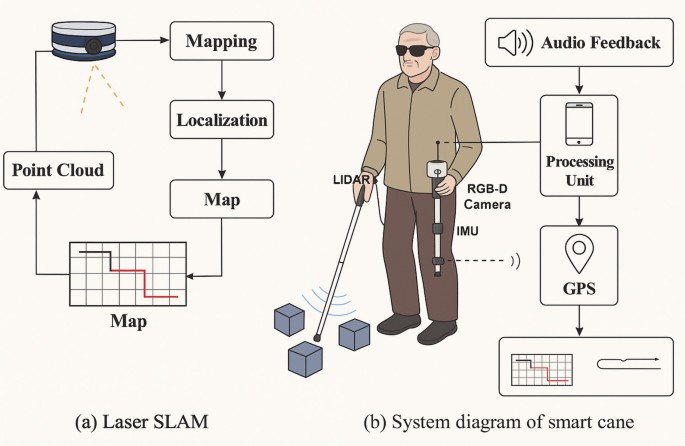
AI assistive technology is moving beyond basic accessibility features to deliver real-world independence in 2026. From smart canes that detect overhead obstacles to voice-controlled home hubs, these tools empower people with disabilities through practical, everyday solutions.
-

Natural language processing for advanced screen readers
Modern screen readers now use large language models to summarize complex web pages instead of reading raw HTML. Tools like NVDA with AI plugins convert dense data tables into concise bullet points. This shift transforms overwhelming information into digestible summaries, allowing blind users to grasp key details instantly without navigating every single element manually. -
)
AI-driven tools for accessible web design
Platforms like AudioEye and UserWay deploy AI to automatically detect and fix accessibility barriers on live websites. These tools scan for missing alt text, low contrast ratios, and keyboard navigation errors in real-time. By automating compliance checks, developers can rapidly remediate issues, ensuring digital spaces remain inclusive without requiring extensive manual audits for every page update. -

Voice recognition systems for motor disabilities
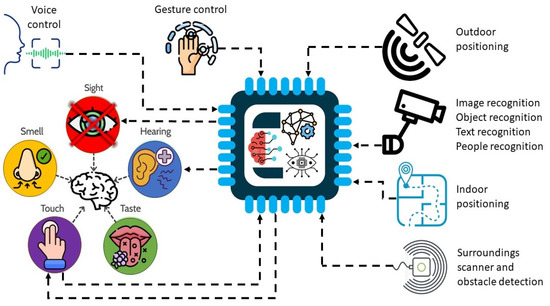
Advanced voice control software, such as Dragon Professional or built-in OS assistants, enables users with limited mobility to operate computers hands-free. These systems learn individual speech patterns to recognize commands accurately, even in noisy environments. Users can navigate menus, type documents, and control smart home devices purely through voice, restoring independence and reducing physical strain. -
Predictive text solutions for cognitive support
AI-powered predictive text goes beyond simple word suggestions to offer context-aware phrase completions for users with cognitive disabilities. Applications like Gboard or specialized communication apps anticipate user intent, reducing the cognitive load required to compose messages. This assistance helps individuals express themselves more clearly and confidently, minimizing frustration and accelerating communication in daily interactions. -
Computer vision apps for visual assistance
Apps like Seeing AI and Envision AI use smartphone cameras to describe surroundings, read handwritten notes, and identify currency. These computer vision tools provide real-time audio feedback, helping visually impaired users navigate unfamiliar spaces and perform daily tasks independently. By converting visual data into spoken descriptions, these apps bridge the gap between the digital and physical worlds for blind users.
How AI changes assistive technology
Assistive technology has traditionally relied on static hardware. A hearing aid amplifies sound at a fixed rate. A screen reader reads text in a predictable voice. These tools are reliable, but they lack the ability to adjust to the user's immediate environment or changing needs. The shift toward AI-driven systems marks a departure from fixed functionality to dynamic adaptation.
AI transforms assistive devices into intelligent partners that learn and respond in real-time. Instead of requiring manual calibration for every new situation, modern AI tools analyze context—such as background noise, lighting conditions, or speech patterns—and adjust their output automatically. This reduces the cognitive load on the user, allowing them to focus on the task at hand rather than the technology itself.
For example, an AI-powered speech-to-text app can distinguish a user's voice from overlapping conversations in a crowded room, providing accurate captions without manual filtering. Similarly, smart glasses can identify obstacles or read street signs for visually impaired users, offering navigation assistance that adapts to the user's pace and location.
This evolution is not just about convenience; it is about empowerment. By making assistive technology more intuitive and responsive, AI helps people with disabilities navigate daily life with greater independence and confidence.
Choosing the right assistive technology
Selecting the right AI assistive technology starts with matching specific disability needs to proven tools. Assistive technology covers products and systems that enhance daily living, but not every tool fits every use case. Start by identifying the exact barrier you face, whether it is reading, mobility, communication, or sensory processing.
AI tools excel at automating repetitive tasks or providing real-time support. For example, a user with dyslexia might benefit from AI-driven text-to-speech software that adjusts reading speed and tone. Someone with limited hand mobility might prefer voice-controlled smart home hubs that replace physical switches. Concrete examples help clarify what is possible.
Key considerations for selection
When evaluating options, look for compatibility with existing devices and ease of setup. Read reviews from other users with similar disabilities to gauge real-world reliability. Prioritize tools that offer customizable settings, as individual needs vary widely. Avoid generic categories; instead, focus on specific features that solve your daily challenges.


As an Amazon Associate, we may earn from qualifying purchases.
| Feature | Text-to-Speech | Voice Hub | Screen Reader |
|---|---|---|---|
| Best For | Dyslexia & Reading | Mobility Challenges | Visual Impairment |
| Setup Difficulty | Low | Medium | Medium |
| AI Benefit | Adaptive Reading | Hands-Free Control | Object Recognition |
The goal is to find a tool that feels like a natural extension of your routine. Test free trials when available to ensure the AI’s output matches your expectations. Remember that assistive technology is a personal journey; what works for one person may not work for another. Focus on practical benefits and long-term usability rather than flashy features.
Frequently asked questions about AI assistive tech
How much do AI assistive technologies cost? Prices vary widely depending on the complexity of the tool. Simple AI-powered screen readers or text-to-speech apps are often free or available through a low-cost monthly subscription. More advanced hardware, such as AI-driven smart glasses or robotic exoskeletons, can range from hundreds to thousands of dollars. Many insurance plans and government grants help offset these costs, making high-end assistive tech more accessible.
Is my personal data safe with AI assistive devices? Privacy is a major concern, but reputable manufacturers prioritize data security. Look for devices that offer local processing (where data stays on the device) rather than cloud-only solutions. Always review the privacy policy to understand how voice recordings, eye-tracking data, or health metrics are stored and shared. Choosing certified medical devices ensures compliance with strict privacy regulations like HIPAA.
Are AI assistive tools effective for everyday use? Yes, when matched to the user’s specific needs. AI enhances traditional assistive technology by adding context awareness and adaptability. For example, AI can distinguish between background noise and speech for hearing aids, or predict typing patterns for those with motor impairments. Effectiveness depends on proper training and customization, but many users report significant improvements in independence and productivity.
Can AI assistive tech work offline? Many modern AI tools offer offline modes for basic functions. Features like real-time captioning or text prediction can run on-device without an internet connection, ensuring reliability in areas with poor connectivity. However, complex tasks like advanced image recognition or cloud-based translation may require an active connection. Check the product specifications to see which features are available offline.
How do I choose the right AI assistive device? Start by identifying the specific barrier you want to overcome, whether it’s communication, mobility, or sensory impairment. Consult with an occupational therapist or assistive technology specialist who can recommend devices like the JAWS screen reader for visual impairments or the Oyster Pro for motor challenges. Trial periods and user reviews from the disability community are invaluable for making an informed decision.
No comments yet. Be the first to share your thoughts!