

A first look at WCAG 3.0
The web accessibility world is bracing for a significant shift with the upcoming release of WCAG 3.0. This isn’t simply an update to the existing Web Content Accessibility Guidelines; it represents a fundamental change in how we approach digital inclusion. For years, we’ve focused on meeting conformance levels – A, AA, and AAA – but WCAG 3.0 moves toward a capability-based model, prioritizing what users can achieve rather than specific implementation details.
This version recognizes that people use the web differently and a single standard doesn't work for everyone. The four guiding principles – Perceivable, Operable, Understandable, and Robust – remain central, but their interpretation is evolving to accommodate a wider range of abilities and technologies. Think of it as moving from prescribing how to build an accessible ramp to ensuring anyone can reach the entrance, regardless of the method.
WCAG 3.0 is a draft. While the W3C is still refining details, we expect a phased rollout to start in 2026. You should start planning now because the shift from rigid checklists to flexible outcomes is a big change for most dev teams.
I believe this change reflects a growing understanding that accessibility isn't about checking boxes, but about creating genuinely inclusive experiences. We have to move past the idea that compliance equals accessibility, and instead focus on empowering all users to participate fully in the digital world.
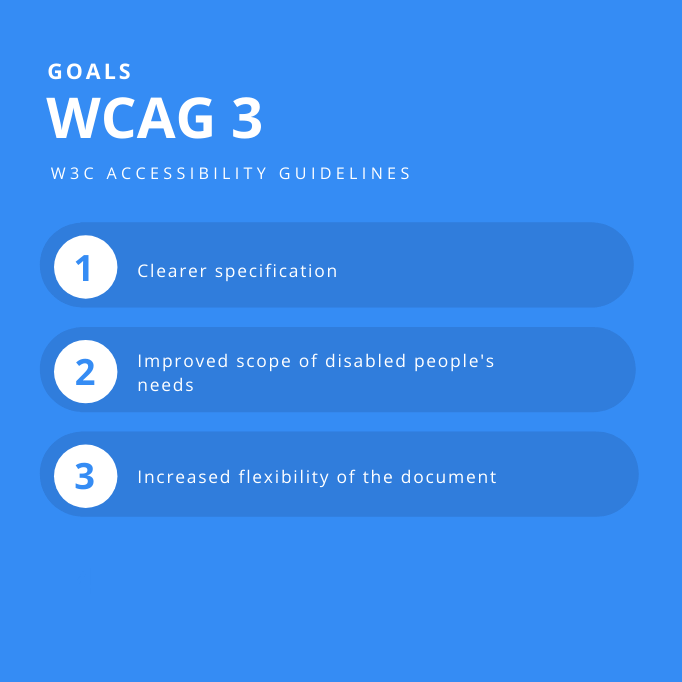
Focusing on what users can actually do
The core of WCAG 3.0’s transformation lies in its capability-based approach. This moves away from prescriptive rules – like “provide alt text for all images” – and instead focuses on the outcome that rule intends to achieve: ensuring content is perceivable regardless of sensory ability. It’s a subtle but powerful shift that demands a deeper understanding of user needs.
The traditional "Accessibility Conformance Levels’ (A, AA, AAA) are being replaced with ‘Accessibility Capabilities’. This means that instead of striving for a specific level of conformance, designers and developers will identify the capabilities required for their target audience and then implement solutions that enable those capabilities. For example, instead of simply adding captions to a video to meet Level AA, the focus is on ensuring the video"s content is perceivable by individuals who are deaf or hard of hearing.
Consider a website selling products. Under the old model, you'd check if forms had labels. With the capability-based approach, you ask: can users successfully complete a purchase using assistive technology? This requires thinking beyond specific code implementation and considering the entire user journey. It’s about identifying barriers and removing them, rather than simply following a checklist.
This approach also allows for more innovation and flexibility. There may be multiple ways to achieve a given capability, and WCAG 3.0 encourages developers to explore those options. It's a move that acknowledges the evolving nature of technology and the diverse needs of users. It means accessibility is less about following rigid rules and more about applying thoughtful problem-solving.
3. https://t.co/EnZHCMCPow - Because designing only for people exactly like you is so 2020. Their WCAG 3.0 guidelines will help you remember that not everyone navigates with their nose pressed against a 6K monitor.
— Khafilat Akinpelu (@smwithkhafilat) April 21, 2025
Key Changes in Perceivability
The Perceivable principle is undergoing significant updates in WCAG 3.0, responding to the increasing complexity of web content. One major area of focus is complex data visualizations. The guidelines will likely offer more detailed guidance on ensuring these visualizations are accessible to users with visual impairments, potentially requiring alternative text descriptions that convey the data’s underlying meaning – not just a simple description of the chart type.
Animated content is also receiving increased attention. While animation can enhance user experience, it can also be distracting or even harmful for some users. WCAG 3.0 will likely provide more specific guidance on controlling animation, allowing users to pause, stop, or hide it. This builds on existing guidance but moves towards more user control.
The importance of captions and transcripts for audio and video content is being further emphasized. Not only are these essential for users who are deaf or hard of hearing, but they also benefit users in noisy environments or those who prefer to read along. The guidelines will likely address the quality and accuracy of captions and transcripts, pushing for professional-grade solutions.
Perhaps most importantly, WCAG 3.0 stresses the need for adaptable content presentation. Users should be able to customize how content is displayed to meet their individual needs, including adjusting font sizes, colors, and contrast. This is a move towards greater user agency and personalization. I anticipate significant discussion around the best practices for implementing adaptable content, particularly for complex layouts.
- Write alt text that explains the data trends in a chart, not just the labels.
- Provide user control over animation and motion.
- Prioritize high-quality captions and transcripts for multimedia.
- Enable adaptable content presentation for personalized user experience.
Moving beyond the keyboard
For a long time, keyboard accessibility has been the cornerstone of the Operable principle. While keyboard access remains crucial, WCAG 3.0 expands the focus to include a wider range of alternative input methods. This acknowledges that not all users can – or want to – use a keyboard.
The guidelines will address the needs of users who rely on voice control, switch devices, and eye tracking technologies. This means ensuring that all interactive elements are operable using these methods. It’s a significant step towards inclusivity, recognizing that there’s no single "right" way to interact with a website.
Adaptable timing and pacing of interactions are also receiving increased attention. Users with cognitive disabilities or motor impairments may need more time to complete tasks. WCAG 3.0 will likely require websites to provide options for adjusting timeouts, animation speeds, and other timing-related settings.
Accessible forms and input validation are becoming even more important. Forms should be clearly labeled, easy to navigate, and provide helpful error messages. The guidelines will likely emphasize the need for error prevention and recovery, helping users avoid and correct mistakes. We need to remember that keyboard access is still foundational, but it’s now part of a much broader consideration of operable design.
Understandability and Adaptive Content
The Understandable principle is where the personalization aspects of WCAG 3.0 truly come to the forefront. The guidelines emphasize the need for content to be presented in multiple ways, tailored to individual user needs and preferences. This isn’t just about providing alternative text; it’s about adapting the entire user experience.
This could involve offering simplified language versions of complex content, providing visual aids to support text-based information, or allowing users to customize the layout and navigation of a website. The goal is to make content accessible to the widest possible audience, regardless of their cognitive abilities or learning styles.
Clear and concise language is paramount. WCAG 3.0 will likely encourage the use of plain language principles, avoiding jargon and complex sentence structures. Predictable navigation is also essential, ensuring that users can easily find what they’re looking for. Consistent labeling and clear visual cues can help users orient themselves and understand the website’s structure.
Error prevention is another key aspect of understandability. Websites should be designed to minimize the risk of errors and provide helpful guidance when errors do occur. This includes providing clear instructions, using appropriate input validation, and offering helpful error messages. I think this section will be particularly challenging for developers accustomed to a "one-size-fits-all’ approach, but it"s essential for creating truly inclusive experiences.
Robustness and Future-Proofing
The Robustness principle remains focused on ensuring that websites are compatible with a wide range of technologies. Semantic HTML and ARIA (Accessible Rich Internet Applications) continue to be essential for providing structured information to assistive technologies.
WCAG 3.0 also covers VR and AR. The specific rules aren't finished, but the goal is to bake accessibility into these spaces early. I'm not sure how the W3C will handle spatial audio or 3D navigation yet, but it's on the radar.
Ensuring accessibility across different browsers and devices is also crucial. Websites should be tested on a variety of platforms and screen sizes to ensure they work as expected for all users. Regular monitoring and updates are essential to address any compatibility issues that may arise.
The challenge with robustness is that the web is constantly evolving. New technologies and browsers are released regularly, and websites must be able to adapt to these changes. A robust website is one that is built on solid foundations and can withstand the test of time. It's a continual effort, not a one-time fix.
Implementation Strategies for 2026
Preparing for WCAG 3.0 requires a proactive approach. Accessibility testing should be integrated into the development process from the beginning, not added as an afterthought. Automated testing tools can help identify some accessibility issues, but manual testing by users with disabilities is essential for a comprehensive assessment.
User research is crucial for understanding the needs of your target audience. Talk to users with disabilities, observe how they interact with your website, and gather feedback on their experiences. This will provide valuable insights into areas for improvement. Don’t assume you know what users need; ask them directly.
Ongoing monitoring is also essential. Accessibility is not a one-time fix; it’s an ongoing process. Regularly scan your website for accessibility issues and address them promptly. Stay up-to-date on the latest accessibility guidelines and best practices.
Organizational buy-in is critical for success. Accessibility should be a priority for the entire organization, not just the development team. Provide training to all relevant staff members and foster a culture of inclusivity. Remember, accessibility benefits everyone, not just people with disabilities.
- Integrate accessibility testing into the development process.
- Talk to users with disabilities to see where they actually get stuck.
- Implement ongoing accessibility monitoring.
- Secure organizational buy-in and provide training.
Accessibility Testing Tools Comparison - 2026 Landscape
| Tool Name | Key Features | Integration | Ease of Use | Cost |
|---|---|---|---|---|
| Axe DevTools | Automated accessibility testing, identifies WCAG violations, provides guidance on fixes, supports various browsers and frameworks. | Browser extensions (Chrome, Firefox, Edge), CLI, integrates with CI/CD pipelines. | Generally considered user-friendly, clear reporting, helpful documentation. | Offers both free and paid plans. Paid plans provide more features and support. |
| WAVE | Visual feedback on accessibility issues directly within a webpage, highlights errors, structural elements, and contrast issues. | Browser extension, can be integrated into web development environments. | Relatively easy to use for quick assessments, visual nature can be helpful for understanding issues. | Free to use as a browser extension. |
| Lighthouse | Comprehensive website auditing tool including accessibility, performance, SEO, and best practices. Reports on accessibility issues based on WCAG. | Integrated into Chrome DevTools, available as a Node CLI tool, can be automated. | Requires some technical knowledge to interpret reports effectively, but well-documented. | Free and open-source. |
| Pa11y | Automated accessibility testing, focuses on WCAG and Section 508 compliance, can be run as a dashboard or integrated into CI/CD. | CLI, dashboard, integrates with CI/CD systems. | Requires some technical setup and configuration, but offers flexibility. | Open-source, costs associated with hosting a dashboard if desired. |
| SortSite | Desktop application for comprehensive website accessibility and compliance testing, including WCAG, Section 508, and other standards. | Desktop application, generates detailed reports. | Can be complex to navigate due to the breadth of features, but provides detailed results. | Commercial license required; pricing varies based on the number of users and features. |
| Tenon.io | Cloud-based accessibility testing service, provides detailed reports and API access for integration. | API, integrates with CI/CD pipelines and other development tools. | Requires some technical expertise to integrate via API, but offers powerful automation capabilities. | Subscription-based pricing; costs depend on the number of tests and features. |
Illustrative comparison based on the article research brief. Verify current pricing, limits, and product details in the official docs before relying on it.


No comments yet. Be the first to share your thoughts!