

Beyond voice notes: the 2026 shift
Old Man Tiber, a retired carpenter who lost the use of his hands in an accident, used to rely on his daughter to write emails and manage his finances. Now, he uses speech-to-text software to run his online woodworking business. It’s a small thing, but it restored his independence, and stories like his are becoming increasingly common.
Speech-to-text has been a useful tool for years, but background noise and thick accents still trip it up. Most systems hit 95% accuracy in a quiet room, but they struggle in a busy coffee shop. 2026 feels different because neural networks are finally getting better at handling the messiness of real-world speech.
We're on the cusp of breakthroughs in real-time translation and significantly expanded language support. These aren’t incremental improvements; they’re changes that will unlock access to communication and information for millions of people with disabilities. It's about removing barriers, not just providing another way to type.
Real-time translation breaks down barriers
Imagine a non-verbal individual attempting to explain a medical issue to a doctor who doesn’t speak their native language. Or a recent immigrant trying to navigate a complex legal document. Real-time translation within speech-to-text software can bridge these communication gaps, providing immediate and accurate interpretation.
This goes far beyond simply converting words from one language to another. It's about understanding context, nuance, and intent. A system needs to recognize not just what is being said, but how it’s being said – the emotional tone, the specific phrasing, the cultural implications. The goal isn’t just linguistic equivalence, but genuine understanding.
Of course, challenges remain. Dialects and accents can be particularly difficult for translation algorithms to process. Translating slang or idiomatic expressions requires a deep understanding of cultural context. But the progress being made in neural machine translation is remarkable, and we’re seeing systems that can handle increasingly complex linguistic scenarios.
Consider a traveler with a speech disability using this technology in a foreign country. They could verbally express their needs – ordering food, asking for directions, seeking medical assistance – and have their speech instantly translated for the local population. This opens up possibilities for independent travel and greater social inclusion.
The global impact of multi-language support
Currently, the vast majority of speech-to-text solutions are heavily biased towards English. While English proficiency is widespread, it’s not universal. This leaves a significant portion of the global population underserved.
The advancements anticipated in 2026 are specifically addressing this gap. Developers are focusing on supporting low-resource languages – those with limited digital data available for training AI models. This involves techniques like transfer learning, where knowledge gained from training on one language is applied to another.
We have to watch for bias here. AI models often favor the dialects they were trained on, which usually means the wealthiest regions. Developers are trying to fix this by using more diverse datasets that include regional slang and varied accents.
Expanding language support has a profound impact on education, employment, and social inclusion. A student who speaks a minority language can access educational materials in their native tongue, an individual can participate in the global workforce, and someone can fully engage in their community.
- Students can use learning materials in their native languages.
- Workers have more chances to join the global workforce.
- Social Inclusion: Greater ability to engage in community life.
Speech-to-Text Software Comparison (2024)
| Software | Language Support | Accent Accuracy | Accessibility Features |
|---|---|---|---|
| Dragon Professional Individual | Extensive - Widely recognized for breadth. | Generally Excellent, particularly after user training. | Customizable Vocabulary, Keyboard Control, Voice Training, Better for dictation-focused tasks. |
| Google Assistant | Moderate - Strong in common global languages, expanding rapidly. | Good - Improves with usage, but can struggle with less common accents. | Voice Control of Device, Integration with Google Services, Customizable Commands, Limited customization options. |
| Windows Speech Recognition | Moderate - Core languages well-supported, others variable. | Fair - Accuracy can be inconsistent, requires clear enunciation. | Keyboard Control, Basic Voice Commands, Integrated into Windows OS, Limited advanced features. |
| Otter.ai | Moderate - Focus on English, with growing support for other languages. | Good - Optimized for meeting transcription, handles multiple speakers well. | Real-time Transcription, Speaker Identification, Searchable Transcripts, Cloud-based, Requires internet connection. |
| Google Docs Voice Typing | Moderate - Supports many languages available in Google Translate. | Good - Accuracy improving, benefits from Google's AI advancements. | Integration with Google Docs, Simple Interface, Free with Google Account, Limited customization. |
| Apple Dictation | Moderate - Supports languages available on Apple devices. | Good - Improves with user’s voice profile, generally reliable. | Integration with Apple Ecosystem, Keyboard Shortcuts, Simple to Use, Limited advanced features. |
Qualitative comparison based on the article research brief. Confirm current product details in the official docs before making implementation choices.
The tech behind the leap
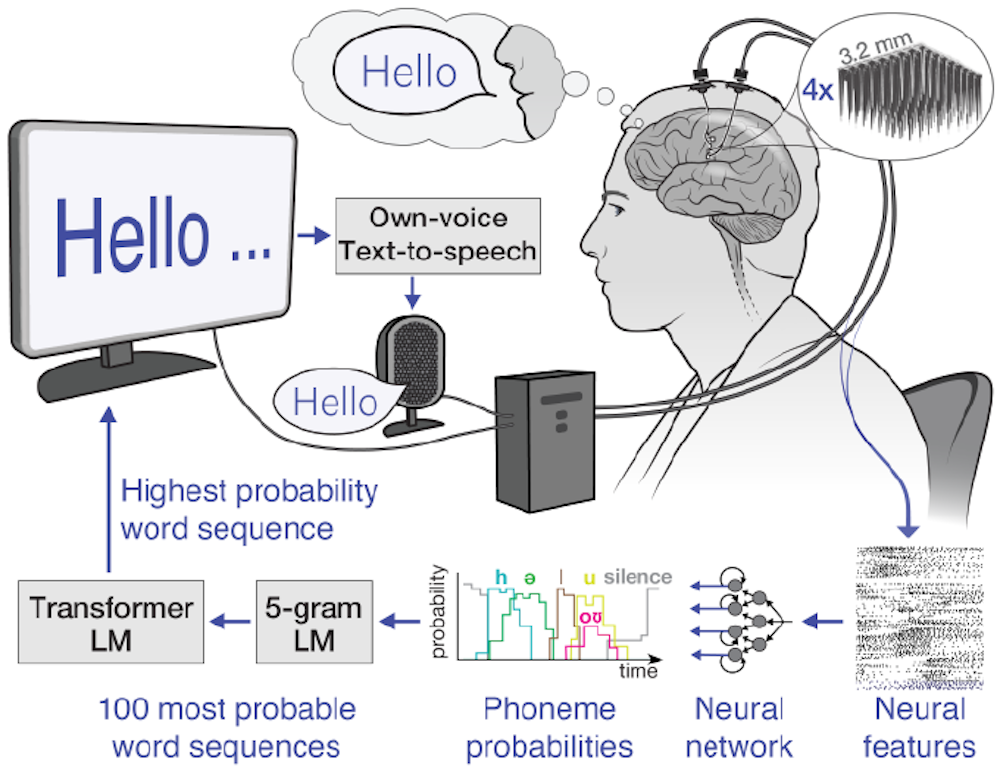
At the heart of these advancements are neural network architectures, particularly transformers. These networks excel at modeling sequential data like speech and text, allowing them to capture long-range dependencies and understand context more effectively. They're a significant improvement over older, recurrent neural network models.
Large language models (LLMs) play a crucial role as well. These models are trained on massive datasets of text and code, enabling them to generate human-quality text and translate languages with remarkable accuracy. They're being fine-tuned specifically for speech recognition and translation tasks.
A key concept is "few-shot learning". Traditionally, AI models required vast amounts of training data for each language. Few-shot learning allows systems to adapt to new languages with only a small amount of labeled data, making it more feasible to support a wider range of languages.
Software standouts on the horizon
Several companies are pushing the boundaries of speech-to-text technology. Google’s ongoing work with its Whisper model promises improved robustness to noise and accents, and a wider range of supported languages. Microsoft is integrating real-time translation capabilities into its Azure Cognitive Services, offering developers tools to build multilingual applications.
Otter.ai is a strong contender, known for its transcription accuracy and collaboration features. They are actively expanding language support and exploring integrations with assistive devices. While specific future features are often kept under wraps, the focus is on improving accuracy, speed, and accessibility.
Braina Pro is a solid choice if you need to customize your setup or plug the engine into other software. Dragon Professional Individual is still the standard for heavy dictation, and its recent AI updates have kept it relevant.
Many of these solutions are moving towards offline capabilities, which is essential for users who need access to speech-to-text in areas with limited or no internet connectivity. Customization options, such as the ability to add specific vocabulary or adjust speech rate, are also becoming increasingly common.
Designing for everyone
Technological advancements mean little if the resulting tools aren’t accessible to everyone who needs them. Accessible design is paramount in speech-to-text software. This includes features like customizable vocabulary, allowing users to add specialized terms or proper nouns.
Adjustable speech rate is also crucial, allowing users to control the speed at which the text is displayed. Compatibility with assistive technologies, such as screen readers and switch devices, is non-negotiable. The software must seamlessly integrate with the tools people already rely on.
Inclusive training data is essential to ensure accuracy for diverse voices, accents, and speech patterns. Data sets must represent the full spectrum of human speech to avoid bias and ensure equitable performance. Data privacy and security are also critical considerations, particularly when dealing with sensitive user data.
Adhering to Web Content Accessibility Guidelines (WCAG) and other accessibility standards is a fundamental step in creating inclusive speech-to-text solutions. It’s about designing with accessibility in mind from the outset, not as an afterthought.
- Customizable Vocabulary: Add specialized terms.
- Adjustable Speech Rate: Control display speed.
- Assistive Technology Compatibility: Seamless integration with screen readers and switch devices.
- Inclusive Training Data: Ensure accuracy for diverse voices.
No comments yet. Be the first to share your thoughts!