

Beyond Dragon: voice control today
I once worked with a designer named Sarah who nearly lost her career to carpal tunnel. She couldn't click a mouse without pain, let alone draft a layout. Switching to voice software didn't just help her type; it let her keep her job. Her experience is a common one for people who suddenly find themselves fighting their own hardware.
Voice recognition used to be a chore. You had to spend hours 'training' the computer to understand your accent, and even then, the error rate was high. Dragon NaturallySpeaking was the only real player for a decade, but it was heavy and expensive. Today, the shift to cloud-based processing means the software actually works the first time you open it.
This isn't just about providing assistive technology for people with disabilities, though that’s a critical application. It’s about hands-free computing for everyone. Think about surgeons dictating notes during an operation, journalists filing reports in the field, or anyone who wants to be more productive while on the move. Voice control is becoming increasingly integrated into our daily lives.
By 2026, we can expect even more sophisticated algorithms, improved noise cancellation, and greater adaptability to different accents and speech patterns. The limitations we once accepted are rapidly disappearing, opening up new possibilities for how we interact with technology.
Speech-to-text solutions for 2026
Choosing the right speech-to-text software depends heavily on your individual needs and budget. Here’s a look at some of the top contenders available in 2026, with a focus on features relevant to users with disabilities.
Nuance Dragon Professional Individual remains a powerful option, especially for professionals who require high accuracy and specialized vocabulary support. It’s known for its customization options and ability to learn your voice over time. However, it comes with a hefty price tag – around $300 for a perpetual license – and can be resource-intensive. It's a solid choice if you need industry-specific terminology support, but it isn’t the most accessible out of the box.
Windows Speech Recognition (built into Windows 10 and 11) is a surprisingly capable free option. While it doesn’t have the same level of accuracy as Dragon, it’s a good starting point, particularly for users who are new to speech-to-text. It integrates seamlessly with Windows applications and offers basic customization features. The biggest drawback is its initial setup can be a bit clunky.
Google Docs Voice Typing is a convenient and accessible option for writing documents. It’s completely free and integrates directly into Google Docs. Accuracy is generally good, especially with a clear microphone and a stable internet connection. However, it requires a Google account and relies heavily on an internet connection. It’s not ideal for dictating long-form content offline.
Apple Dictation (available on macOS and iOS) is another free and easy-to-use option. It’s well-integrated with the Apple ecosystem and offers good accuracy. Like Google Docs Voice Typing, it requires an internet connection for optimal performance. It’s a good choice for Apple users who need basic dictation capabilities.
Otter.ai is a transcription service that’s particularly useful for meetings and interviews. It offers real-time transcription and can identify different speakers. The free plan is limited to 300 transcription minutes per month, but paid plans offer more generous allowances. While not specifically designed for disabilities, the transcription accuracy and speaker identification features can be very helpful for individuals with hearing impairments.
Essential Speech-to-Text Software and Accessories for Enhanced Accessibility
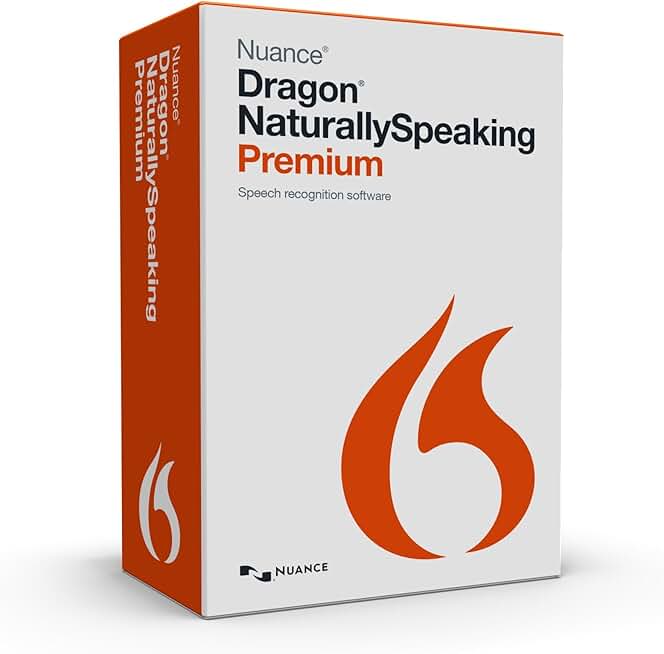
Advanced speech recognition technology · Dictate documents and control your computer by voice · Customizable vocabulary for improved accuracy
While discontinued, Dragon NaturallySpeaking Premium 13 was a leading speech-to-text software that empowered users to interact with their computers and create content using their voice, offering significant accessibility benefits.

High-quality condenser microphone for clear audio capture · Multiple pickup patterns for versatile recording options · Plug-and-play USB connectivity for easy setup
The Blue Yeti microphone provides exceptional audio clarity, crucial for accurate speech-to-text input, and its ease of use makes it an accessible tool for various voice-controlled applications.

Industry-leading noise cancellation for focused listening · Comfortable over-ear design for extended wear · Integrated microphone for clear voice input
Bose QuietComfort headphones offer superior noise cancellation, creating an optimal environment for accurate speech recognition, while their comfortable design ensures usability for long periods.

Noise-cancelling microphone filters out background distractions · HD sound quality for clear voice transmission · Comfortable double-sided design for secure fit
This headset's noise-cancelling microphone ensures that only the user's voice is captured, significantly improving the accuracy of speech-to-text software, and its comfortable design is suitable for prolonged use.
As an Amazon Associate I earn from qualifying purchases. Prices may vary.
Essential accessibility features
Beyond basic accuracy, certain accessibility features can make a huge difference in the usability of speech-to-text software. Customizable vocabulary is essential for individuals who work in specialized fields, such as medicine or law. The ability to add custom words and phrases ensures that the software can accurately transcribe technical terminology.
User profiles allow multiple users to create their own voice profiles, which is especially useful for families or shared devices. Command customization is incredibly important for people with limited mobility. Being able to assign voice commands to specific actions – such as opening applications, formatting text, or navigating the operating system – can significantly improve efficiency and independence.
Integration with assistive devices, like switch control and eye-tracking technology, is crucial for individuals with severe physical limitations. Software that supports these devices allows users to control their computers entirely with their voice and minimal physical movement. Support for multiple languages and accents is also vital for a diverse user base.
Consider how easily the software integrates with the applications you use most often. A seamless workflow can save a lot of time and frustration. Also, look for software that offers clear and concise documentation, as well as responsive customer support.
Mobile voice tools
Mobile speech-to-text has come a long way in recent years. Google Assistant and Siri both offer surprisingly accurate dictation capabilities, and they’re readily available on most smartphones. These assistants are convenient for quick notes, sending messages, and setting reminders.
However, mobile speech-to-text generally isn’t as accurate or feature-rich as desktop software. Noise cancellation can be an issue in busy environments, and the lack of customization options can be limiting. The built-in dictation features on Android and iOS are improving, but they still fall short of dedicated speech-to-text applications.
There aren’t a lot of mobile-specific apps that stand out for users with disabilities, but some transcription services, like Otter.ai, offer mobile apps that can be useful for recording and transcribing audio on the go. It’s also important to be aware of the privacy implications of using voice assistants. Your voice data may be stored and analyzed by the service provider.
Mobile Speech-to-Text Solutions: A Comparative Overview (2026)
| Feature | Google Assistant | Siri | Android Dictation | iOS Dictation |
|---|---|---|---|---|
| Accuracy | Generally considered highly accurate, continually improving with machine learning. | Accuracy has improved significantly, performs well in quiet environments. | Accuracy can vary based on device and background noise. | Generally accurate, benefits from Apple's focus on on-device processing. |
| Customization | Offers extensive customization through voice models and personalized settings. | Limited customization options; primarily adapts to user's voice over time. | Offers basic punctuation and voice command customization. | Allows for custom vocabulary additions to improve recognition of specific terms. |
| Privacy | Data processing occurs in the cloud; users should review Google's privacy policies. | Apple emphasizes on-device processing for some commands, enhancing privacy. Cloud processing also occurs. | Data processing location depends on device settings and may involve cloud services. | Prioritizes on-device processing where possible, but cloud processing may be utilized. |
| Offline Access | Limited offline functionality; requires internet connection for optimal performance. | Limited offline functionality; some basic commands may work offline. | Basic dictation functionality available offline, but accuracy is reduced. | Offers offline dictation capabilities, providing functionality without an internet connection. |
| Integration with Apps | Deep integration with many third-party apps and services. | Strong integration within the Apple ecosystem; compatibility with third-party apps varies. | Integration varies depending on the app and Android version. | Seamless integration with Apple's suite of apps; compatibility with third-party apps is generally good. |
| Accessibility Features | Works with Android's built-in accessibility suite. | Integrates with VoiceOver and other iOS accessibility features. | Supports Android's accessibility services. | Designed to work seamlessly with iOS accessibility features like VoiceOver. |
Illustrative comparison based on the article research brief. Verify current pricing, limits, and product details in the official docs before relying on it.
Voice control and the web
The effectiveness of speech-to-text software is heavily dependent on the accessibility of the websites and web applications you’re using. Poorly designed websites can be incredibly difficult to navigate with voice control. Semantic HTML – using appropriate tags to structure content – is essential for making websites accessible to screen readers and voice control software.
ARIA attributes (Accessible Rich Internet Applications) provide additional information to assistive technologies, helping them understand the purpose and functionality of web elements. Proper keyboard navigation is also crucial, as many voice control users rely on keyboard shortcuts to interact with web pages. Websites that are designed with accessibility in mind will be much easier to use with speech-to-text.
George Mason University’s upcoming updates to comply with ADA Title II, scheduled for April 24, 2026, are a positive step towards improving web accessibility. These updates will require all university websites and mobile apps to meet stricter accessibility standards, benefiting all users, including those who rely on voice control. It's a reminder that accessibility isn't just a technical issue; it’s a legal and ethical obligation.
Keyboards and hardware alternatives
While speech-to-text is a powerful tool, many users find that combining it with alternative input methods can provide even greater flexibility and control. One-handed keyboards – both physical and software-based – allow users to type with only one hand, which can be helpful for individuals with limited mobility in one arm.
There are a variety of one-handed keyboard layouts available, and many operating systems offer built-in support for them. Head-tracking devices allow users to control their computers using head movements, while eye-tracking technology enables control with eye gaze. These technologies can be particularly beneficial for individuals with severe physical disabilities.
Integration between these alternative input methods and speech-to-text software is key. For example, you might use a head-tracking device to select text and then use speech-to-text to edit it. I'm not sure about the very latest advancements in eye-tracking resolution and accuracy, but the technology is continually improving. The best approach will depend on your individual needs and abilities.
Speech-to-Text Options
- Dragon Professional Individual - A widely-used, commercially available speech recognition software known for its accuracy and customization options. It allows for voice control of applications and dictation.
- Windows Speech Recognition - Built-in to many versions of Windows, this provides a free, basic speech-to-text functionality. It's a good starting point for users new to speech recognition.
- Google Docs Voice Typing - Accessible directly within Google Docs, this offers a convenient and free option for dictation, leveraging Google’s speech recognition technology.
- Otter.ai - Primarily designed for meeting transcription, Otter.ai also functions as a real-time speech-to-text tool. It offers collaboration features and integrates with various platforms.
- Apple Dictation - Integrated into macOS and iOS, Apple Dictation provides a user-friendly speech-to-text experience for Apple device users. Enhanced Dictation offers improved accuracy.
- Braina Pro - This software offers speech recognition alongside virtual assistant capabilities, allowing users to control their computer and automate tasks with voice commands.
- Microsoft 365 Dictate - Available as an add-in for Microsoft Word, Outlook, and PowerPoint, Dictate leverages Microsoft’s cloud-based speech recognition service.
Where voice tech is headed
We are moving toward a point where the keyboard is optional. The next step isn't just better accuracy, but better context—software that knows the difference between a command and a conversation even in a noisy room. It's about making the interface disappear.
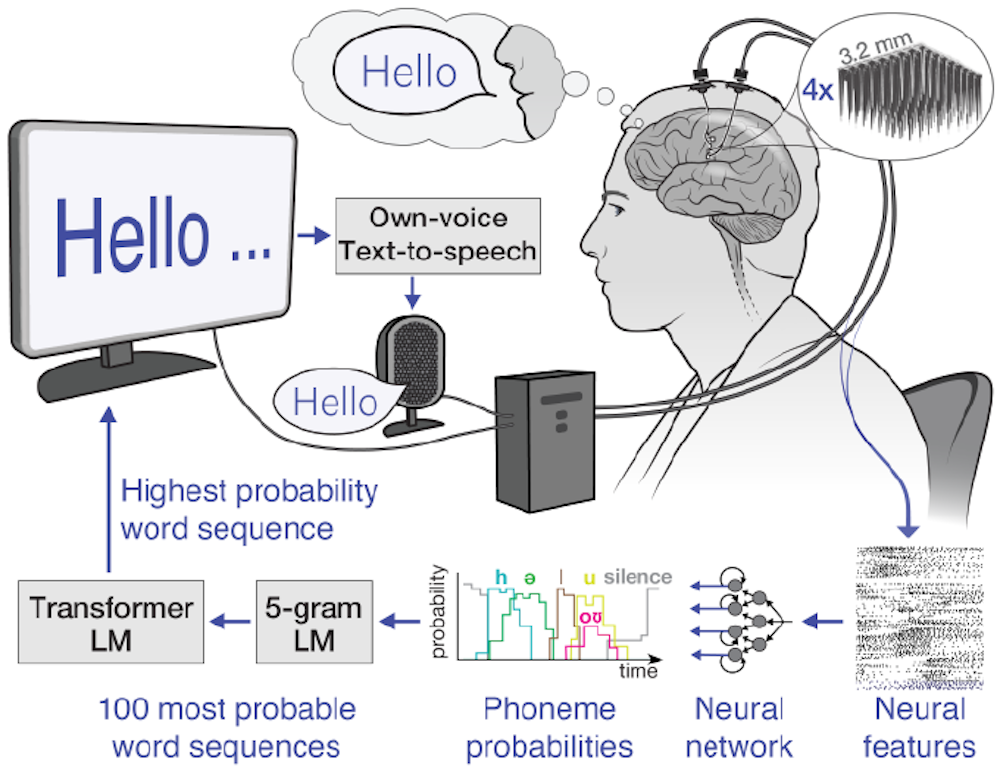
The potential of neural interfaces – technology that directly connects the brain to a computer – is particularly exciting. While still in its early stages, neural interface technology could eventually allow users to control computers with their thoughts, offering a completely hands-free experience. The increasing integration of voice control into everyday devices – such as smart home appliances and wearable technology – will also make it more accessible and convenient.
However, it’s important to consider the ethical implications of this technology. We need to ensure that voice control systems are private, secure, and unbiased. Accessibility for all – regardless of language, accent, or ability – must be a priority. As voice control becomes more pervasive, it has the potential to empower individuals and transform the way we interact with the world.
No comments yet. Be the first to share your thoughts!