

The Rise of AI Speech-to-Text: A Game Changer for Accessibility
Speech-to-text technology isn't new, but the recent leaps in artificial intelligence are fundamentally changing what’s possible. For years, voice recognition was clunky, prone to errors, and often frustrating for users. Now, thanks to deep learning and neural networks, we’re seeing accuracy rates that were previously unimaginable. This isn't just about transcribing spoken words; it’s about understanding the meaning behind them.
The improvements are particularly impactful for individuals with disabilities. People with motor impairments can use voice control to operate computers and devices, bypassing the need for traditional input methods. Those with dyslexia or aphasia may find it easier to express themselves through speech than through writing. It’s a tool that can unlock independence and participation in ways that weren’t possible before.
2026 is shaping up to be a pivotal year because of the continued refinement of these AI models and the increasing availability of affordable, powerful hardware. We’re seeing more software integrating these advancements, and the cost of entry is decreasing. This combination means that speech-to-text is becoming accessible to a wider range of people than ever before. It's not just a convenience; it's a pathway to inclusion.
The benefits extend beyond individual users. Accessibility features built on speech-to-text are becoming standard in education and the workplace, creating more inclusive environments for everyone. Real-time captioning, voice-controlled applications, and hands-free operation are becoming increasingly common, and they’re all powered by this technology.
Decoding the Accuracy: What Makes 2026’s AI Different?
The core of the improvement is, unsurprisingly, data. Modern AI speech-to-text models are trained on massive datasets of spoken language. This isn’t just about quantity, though—it’s about diversity. The best models are trained on recordings from people with different accents, speaking at different speeds, and in various acoustic environments. This creates a more robust and adaptable system.
One key metric is Word Error Rate (WER), which measures the percentage of words incorrectly transcribed. WER has steadily decreased over the past few years, and that trend is expected to continue. Lower WER means fewer corrections and a more fluid user experience. However, it’s important to remember that WER is just one measure of accuracy. Contextual understanding is equally important.
AI is now much better at handling homophones—words that sound alike but have different meanings (like "there,’ ‘their,’ and ‘they’re’). The software uses context to determine the correct word, reducing errors. This is where the advancements in natural language processing really shine. The system doesn’t just hear the words; it tries to understand what"s being said.
Edge computing is also playing a role. Processing speech data directly on the device—rather than sending it to the cloud—can reduce latency and improve responsiveness. This is particularly important for real-time applications, like live captioning or voice control. It also addresses some privacy concerns, as the data doesn’t leave the device.
- Massive Datasets: Models are trained on huge collections of speech data.
- Diversity in Training: Recordings include various accents and speaking styles.
- Improved Contextual Understanding: AI considers the surrounding words to choose the correct interpretation.
- Edge Computing: Processing data locally reduces latency and enhances privacy.
AI-Powered Speech-to-Text Accuracy Across User Groups (2026)
| User Group | Accuracy Characteristics | Typical Difficulties | Potential Improvements |
|---|---|---|---|
| Individuals with Clear Speech | Generally High Accuracy | Minimal challenges; occasional homophones. | Custom vocabulary training for specialized terminology. |
| Individuals with Regional Accents | Variable Accuracy; often requires adaptation | Accent recognition can be inconsistent; misinterpretation of phonetic variations. | Software with robust accent adaptation features; user-specific training. |
| Individuals with Dysarthria (Slurred Speech) | Lower Accuracy; significant variability | Difficulty with articulation; inconsistent speech patterns; slow speech rate. | Specialized models trained on dysarthric speech; phonetic modeling; signal processing techniques to enhance clarity. |
| Individuals in Noisy Environments | Reduced Accuracy; dependent on noise level | Background noise interference; difficulty isolating speech signal. | Noise cancellation algorithms; directional microphones; adaptive filtering. |
| Bilingual Speakers (Switching Languages) | Accuracy Fluctuations during transitions | Language switching can cause errors; code-mixing challenges. | Real-time language identification; bilingual speech models; clear language indication. |
| Individuals with Stammering/Stuttering | Intermittent Accuracy Drops | Disruptions in speech flow; hesitations; repetitions. | Models trained to recognize disfluencies; algorithms that focus on completed syllables/words. |
| Individuals with Soft Speech | Lower Accuracy; volume dependent | Quiet speech levels can be difficult to detect. | Automatic gain control; noise reduction; microphone sensitivity adjustment. |
Qualitative comparison based on the article research brief. Confirm current product details in the official docs before making implementation choices.
Well there's two things holding Toby back.
— dipper :P (@dippindotz_exe) April 12, 2026
1. He's disabled, it's one of the reasons Deltarune chapters take so long, he can't type without pain. He uses speech to text software.
And 2. He's spent the last decade working on Deltarune. Probably even before Undertale released.
Top Contenders: Speech-to-Text Software for 2026
Choosing the right speech-to-text software depends heavily on your specific needs and workflow. Dragon Professional Individual (Nuance) has long been a leader in the field, known for its accuracy and customization options. It’s a powerful tool, particularly for professionals who dictate long documents, but it comes with a significant price tag—around $200 for a perpetual license as of late 2025.
Google Cloud Speech-to-Text offers a highly scalable and accurate solution, particularly for developers. It’s a cloud-based service, so it requires an internet connection. Pricing is pay-as-you-go, based on the amount of audio processed. It’s a good option if you need to integrate speech-to-text into an application or workflow, but it might not be the best choice for offline use.
Microsoft Azure Speech Services is another strong contender in the cloud-based space. It’s similar to Google Cloud Speech-to-Text in terms of features and pricing. Azure offers a wider range of customization options, including the ability to create custom acoustic models. Both Google and Azure are popular choices for enterprise-level solutions.
Otter.ai is a popular choice for meeting transcription and note-taking. It integrates with Zoom and other video conferencing platforms, making it easy to capture and share meeting minutes. While it’s not as accurate as Dragon or the cloud-based services for general dictation, it’s excellent for its intended purpose. Their basic plan is free, with paid subscriptions offering more features and transcription time.
There are also newer entrants constantly appearing. SayIt Medical Voice To Text Software, for example, caters specifically to the medical field, offering specialized vocabularies and integration with Electronic Health Records. It’s priced in Canadian Dollars and requires a specific setup for medical professionals. The best approach is to test out free trials whenever possible to see what works best for your voice and use case.
Beyond the Desktop: Mobile Speech-to-Text and App Integration
Mobile devices have become powerful platforms for speech-to-text, and both iOS and Android offer built-in options. Siri on iOS and Google Assistant on Android provide convenient voice control and dictation capabilities. These are great for quick tasks like sending messages or setting reminders, but their accuracy can sometimes be limited, especially in noisy environments.
Third-party apps offer enhanced features and customization. Apps like Otter.ai also have mobile versions, allowing you to transcribe recordings on the go. Gboard, Google’s keyboard app, is also a strong contender, offering accurate dictation and real-time translation. It’s available for both iOS and Android.
Mobile speech-to-text integrates seamlessly with other accessibility features. On iOS, VoiceOver screen reader can work in conjunction with Siri and dictation, providing a hands-free experience for users with visual impairments. Similarly, Android’s TalkBack screen reader integrates with Google Assistant. These integrations are crucial for creating a truly accessible mobile experience.
However, mobile speech-to-text presents unique challenges. Background noise can significantly impact accuracy, and battery life can be a concern with continuous use. Finding a quiet environment and optimizing your device’s settings can help mitigate these issues. Using a headset with a noise-canceling microphone can also improve performance.
Customization and Control: Adapting Speech-to-Text to Your Needs
One of the most important aspects of speech-to-text is the ability to customize it to your specific voice and needs. Most software allows you to create custom vocabularies – lists of words and phrases that are specific to your field or interests. This helps improve accuracy by teaching the software to recognize terms it might not otherwise know.
Training the software to recognize your voice is also crucial. This involves reading a series of prompts to help the system learn your accent, speech patterns, and pronunciation. The more you train the software, the more accurate it will become. Dragon Professional Individual is particularly strong in this area, offering robust voice training tools.
Adjusting settings for noise cancellation and accent recognition can also make a big difference. Many programs allow you to fine-tune these settings to optimize performance in different environments. Experimenting with these settings is key to finding what works best for you.
Some software allows you to create custom commands and macros, automating repetitive tasks. For example, you could create a command to automatically insert your address or signature into a document. Integration with assistive technology devices, such as head pointers and eye-tracking systems, further expands the possibilities for customization.
Privacy and Security: Protecting Your Voice Data
As with any technology that collects personal data, privacy and security are important considerations with speech-to-text software. It’s essential to understand how your voice data is being collected, used, and stored. Cloud-based services typically store your data on their servers, while offline software processes data locally on your device.
Review the privacy policies of different software providers carefully. Look for information about data encryption, data retention, and data sharing practices. Some providers offer end-to-end encryption, which means that your data is encrypted both in transit and at rest. Others may share your data with third parties for advertising or analytics purposes.
Using on-device processing can help protect your privacy, as your data doesn’t leave your device. However, this may come at the cost of accuracy or features. Consider the trade-offs carefully. Be cautious about granting speech-to-text apps access to your microphone and other sensitive data.
It's worth keeping in mind that voice data can be used to identify you, so it’s important to take steps to protect your privacy. Using a strong password and enabling two-factor authentication can help secure your account. Be mindful of what you say when using speech-to-text, especially in public places.
The Future of Voice Control: What’s on the Horizon?
The future of speech-to-text is incredibly promising. We can expect to see continued improvements in AI, resulting in even more accurate and robust models. Advancements in areas like unsupervised learning and transfer learning could allow software to adapt to new voices and accents more quickly and easily.
Real-time translation is another exciting area of development. Imagine being able to have a conversation with someone who speaks a different language, and the software automatically translates your speech in real-time. This could break down communication barriers and foster greater understanding.
Voice-controlled virtual reality (VR) and augmented reality (AR) are also on the horizon. Imagine navigating a virtual world using only your voice. This could open up new possibilities for gaming, education, and training. The integration of speech-to-text with smart home devices will also continue to expand, allowing you to control your environment with your voice.
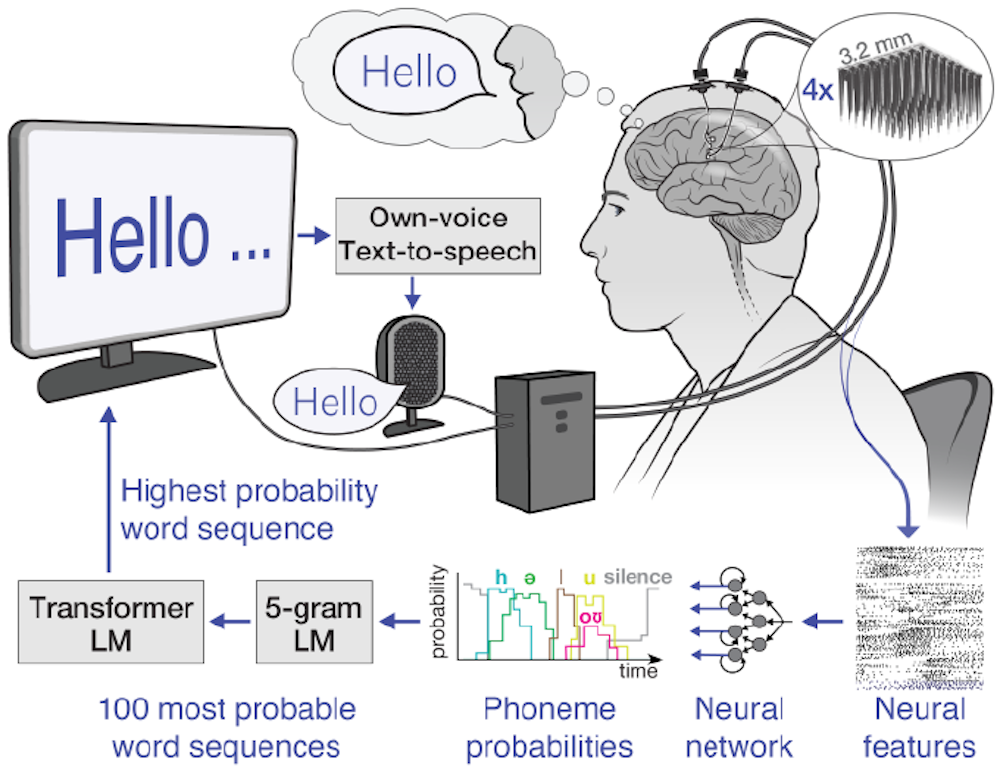
Perhaps the most ambitious development is the potential for integration with brain-computer interfaces (BCIs). While still in its early stages, this technology could allow people to control computers and devices directly with their thoughts. This could be a game-changer for individuals with severe disabilities. It is a long road ahead, but the advancements in speech-to-text are laying the groundwork for a more accessible and inclusive future.
No comments yet. Be the first to share your thoughts!