

The shift toward intelligent speech
For decades, screen readers have been essential tools for people with visual impairments, transforming digital text into speech or braille. Early screen readers relied on rigid, rule-based systems – painstakingly programmed to interpret every element on a screen. These systems worked, but often required significant user expertise and struggled with complex or poorly coded websites. Now, we’re witnessing a fundamental shift.
The integration of artificial intelligence, particularly advancements in voice recognition and natural language processing, is driving a revolution in assistive technology. AI screen readers aren’t simply reading text; they’re understanding it, interpreting context, and adapting to individual user needs in ways previously unimaginable. This isn’t about incremental improvements to existing technology; it represents a paradigm shift in how visually impaired individuals interact with the digital world.
This new generation of screen readers learns from user behavior, anticipates needs, and offers a more intuitive and seamless experience. The ability to accurately identify images, understand complex layouts, and navigate dynamic content is dramatically improving. It's a change that is empowering users to access information and participate online with greater independence and efficiency. The reliance on coded rules is lessening, being replaced by systems that can adapt and learn.
The speed of innovation is remarkable. Just a few years ago, many of these features were confined to research labs. Today, they're appearing in commercial products and open-source projects, promising a more accessible digital future for everyone. I believe we’re at the cusp of a new era where technology truly empowers, instead of creating further barriers.
JAWS 2026 and automated labeling
JAWS 2026 introduces Page Explorer to help with messy web layouts. It creates a map of the page so you don't have to tab through every single element to find what you need. This is a major help for dense reports or web apps that usually feel like a wall of text.
Instead of linearly reading through a page, Page Explorer allows users to quickly grasp the overall layout and hierarchy of content. It presents a navigable outline of the page, identifying headings, landmarks, and key sections. This is incredibly useful for navigating complex articles, reports, or web applications where simply listening to the content sequentially would be overwhelming. It’s like having an instant table of contents generated for every webpage.
AI Labeller is equally impressive. It automatically identifies and describes images, form fields, and other elements that often lack descriptive alt text. This dramatically reduces the frustration of encountering unlabeled images, and allows users to understand the visual context of a webpage. It doesn't just label that there's an image, it attempts to describe what the image is. I'm curious how well it handles abstract art or complex diagrams.
The implications for accessibility of dynamic content are significant. As web pages become more interactive and rely on JavaScript, ensuring accessibility becomes increasingly challenging. These AI features help bridge the gap, allowing screen readers to keep pace with evolving web technologies. The ability to understand and convey the state of dynamic elements, such as expanding menus or updating charts, is crucial for a seamless user experience. I’ve read reports that JAWS 2026 also has improved scripting support, making it easier to access web applications.
Open source AI in NVDA
NVDA (NonVisual Desktop Access) is a popular, and importantly, free and open-source screen reader. This open-source nature is proving to be a significant advantage in the age of AI. The community-driven development model fosters rapid innovation, allowing developers to quickly integrate and test new AI features and plugins. It’s a vibrant ecosystem where contributions are welcomed and improvements are constantly being made.
Several AI plugins and extensions are already available for NVDA, enhancing its capabilities in areas like optical character recognition (OCR) and natural language processing. These extensions leverage the power of AI to improve speech synthesis, enhance navigation, and provide more context-aware assistance. The open-source community is actively working on integrating AI-powered image description and object recognition features, similar to those found in JAWS 2026.
One of the key benefits of the open-source approach is wider accessibility. Because the source code is publicly available, developers can customize NVDA to meet specific needs and preferences. This is particularly important for users with unique requirements or those who prefer a highly tailored experience. It also means that NVDA can be adapted to support a wider range of languages and assistive technologies.
However, the open-source model also presents challenges. Maintaining quality control and ensuring compatibility across different platforms and configurations can be complex. The speed of AI feature adoption can sometimes be slower compared to commercial products due to the reliance on volunteer contributions. Despite these challenges, the open-source community is demonstrating a remarkable ability to leverage AI to improve the accessibility of digital content.
Enhance Your NVDA Experience: Top Accessories for 2026
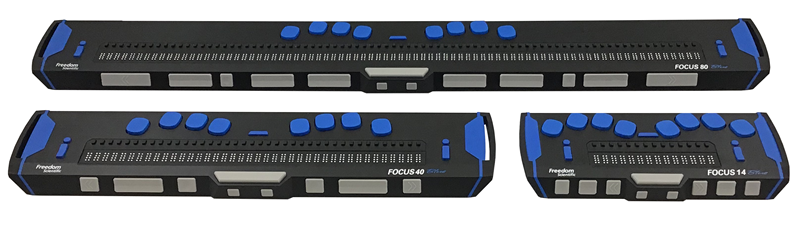
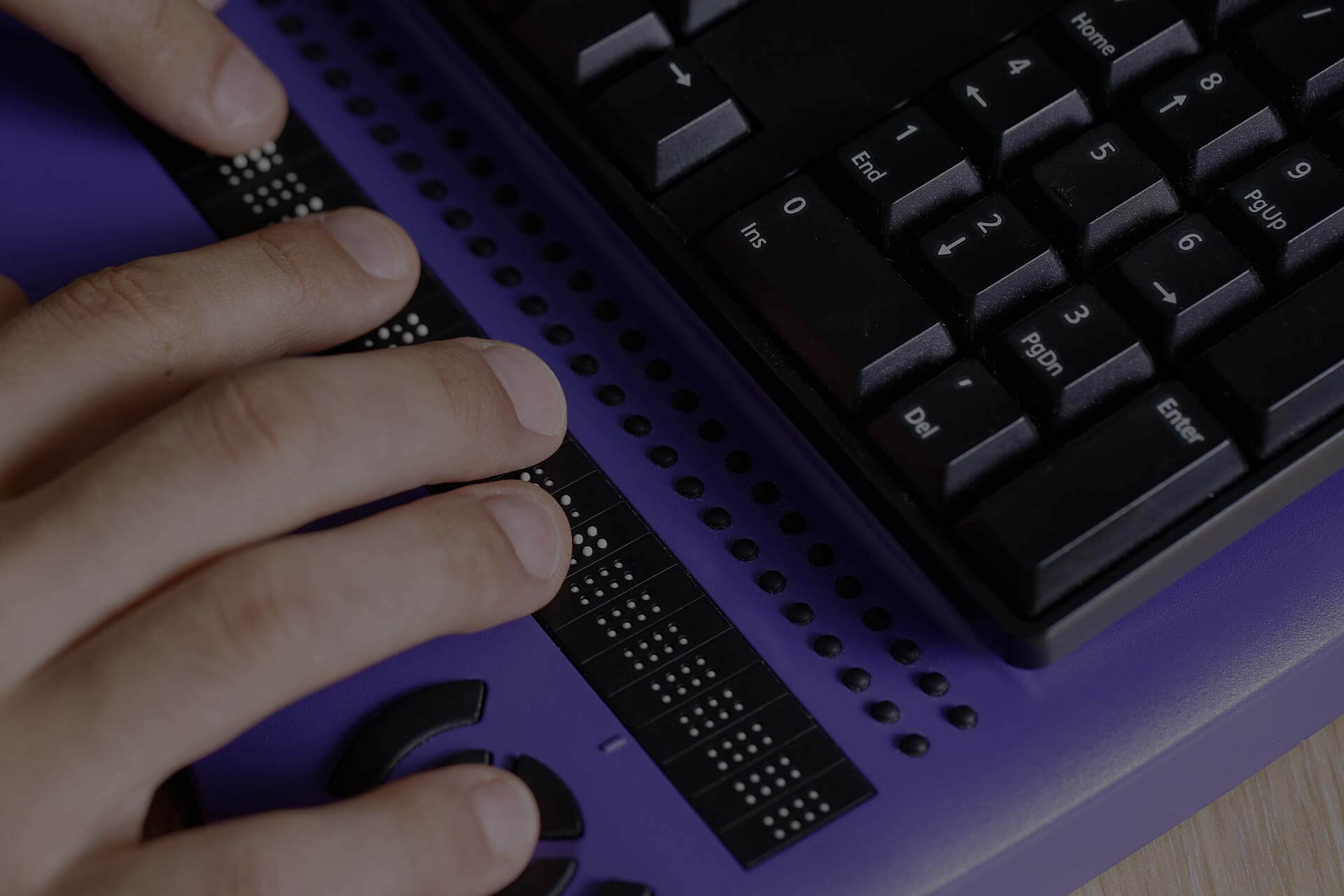
Refreshable braille display · Tactile feedback for text · Portable design
The Focus Blue Braille Display offers tactile access to screen reader output, providing a crucial alternative or supplement to auditory feedback for users who prefer or require braille.

Split, curved keyframe · Pillowed wrist rest · Natural typing posture
The Logitech Ergo K860 keyboard promotes a more natural hand and arm posture, reducing strain during extended computer use, which is beneficial for all users, including those relying on screen readers.

World-class noise cancellation · Immersive Spatial Audio · Comfortable over-ear design
Bose QuietComfort Ultra headphones deliver exceptional audio clarity and noise cancellation, creating an immersive listening environment that enhances the auditory experience of screen readers.

Thumb-controlled trackball · Multi-device connectivity · Ergonomic design
The SABLUTE MAM2 trackball mouse allows for precise cursor control with minimal wrist movement, offering an ergonomic alternative for navigation that can be more comfortable for some users.

Connects 3.5mm headphones to USB-C devices · Supports audio playback · Compact and portable
This adapter enables the use of standard 3.5mm headphones with devices that only have a USB-C port, ensuring compatibility with a wide range of audio output devices for screen reader users.
As an Amazon Associate I earn from qualifying purchases. Prices may vary.
Orca and the Linux Ecosystem
Orca is the screen reader that is natively integrated into the GNOME desktop environment, making it a natural choice for users who prefer a fully open-source workflow on Linux. Its tight integration with the operating system offers several advantages, including seamless accessibility features and efficient resource utilization. Orca has been steadily improving, and is gaining traction among Linux users.
Orca leverages AI for improved speech synthesis and navigation, although it currently lags behind JAWS and NVDA in terms of AI feature maturity. It incorporates AI-powered text-to-speech engines that provide more natural-sounding voices and better pronunciation. It also utilizes AI algorithms to enhance heading detection and content analysis, making it easier to navigate complex web pages.
Orca's strengths lie in its accessibility within the Linux ecosystem and its commitment to open standards. It’s a viable option for users who prioritize a fully open-source solution and are comfortable with the Linux environment. However, its limited support for Windows and macOS may be a drawback for users who need cross-platform compatibility.
I'm not sure how Orca currently compares to the commercial options in terms of the sophistication of its AI-powered features. It seems to be catching up, but needs further development in areas like image recognition and dynamic content handling. It is a project to watch, though, as the Linux accessibility space continues to grow.
Beyond the Big Three: Emerging AI Screen Readers
While JAWS, NVDA, and Orca dominate the screen reader market, several emerging players are pushing the boundaries of AI-powered accessibility. Products showcased at CES 2026 highlighted a wave of innovation, with smaller companies exploring novel approaches to assistive technology. These companies are often unburdened by legacy code and can more quickly adopt cutting-edge AI techniques.
One example is SenseiReader, which focuses on providing personalized reading experiences. It uses AI to analyze user reading patterns and adjust the reading speed, voice, and content presentation accordingly. Another promising product is AuraScreen, which leverages computer vision to provide real-time descriptions of the user's surroundings, augmenting the screen reader's functionality. These aren't simply replicating existing features; they're exploring new modalities.
These companies are experimenting with different AI models and algorithms to improve accuracy, efficiency, and user experience. Some are focusing on specific niches, such as accessibility for STEM fields or support for users with cognitive impairments. This targeted approach allows them to develop solutions that are highly tailored to the needs of specific user groups. I find this specialization very encouraging.
What sets these emerging players apart is their willingness to embrace experimentation and challenge conventional wisdom. They're not afraid to try new things and push the boundaries of what's possible. While they may not have the resources or market share of the established players, they are driving innovation and shaping the future of AI-powered accessibility.
AI-Powered Screen Reader Comparison - 2026
| Screen Reader | AI Feature Maturity | Ease of Use | Customization Options | Platform Support | Community Support |
|---|---|---|---|---|---|
| JAWS 2026 | Developing - Enhanced page analysis | Moderate - Steep learning curve for advanced features | Very High - Extensive scripting and settings | Windows Primarily, limited support for others | High - Large, established user base |
| NVDA 2026 | Emerging - AI-powered object recognition in development | Moderate - Generally considered easier to learn than JAWS | High - Add-ons and configuration options available | Windows, with experimental support for others | High - Active and growing open-source community |
| Orca 2026 | Basic - Integration with GNOME accessibility features | Moderate - Linux-focused, interface may be unfamiliar to some | Medium - Customizable through GNOME settings and plugins | Linux, limited support for others | Medium - Dedicated but smaller community |
| Ava 2026 (Emerging) | Promising - Focus on natural language processing for content summarization | High - Designed for intuitive interaction | Medium - Customization options are growing | Web-based, with potential for browser extensions | Growing - Early adopter community |
| Lumina 2026 (Emerging) | Significant - AI-driven contextual understanding of web elements | Moderate - Requires some understanding of AI concepts | High - Advanced scripting and AI parameter adjustments | Windows and Web | Moderate - Developing community support |
Qualitative comparison based on the article research brief. Confirm current product details in the official docs before making implementation choices.
Voice recognition performance
Voice recognition accuracy is a critical factor in the usability of AI screen readers. The ability to control the screen reader with voice commands can significantly enhance efficiency and independence. Recent advancements in AI have dramatically improved voice recognition accuracy, even in noisy environments and with diverse accents. However, significant differences remain between different screen readers.
JAWS 2026 is currently the most accurate for complex voice commands. NVDA is close behind if you use the right community plugins, while Orca still feels a bit basic. I've found that JAWS handles background noise better than the others, though none of them are perfect yet.
The improvements aren’t just about recognizing what is said; it’s about understanding intent. Modern AI screen readers can now differentiate between similar-sounding commands and anticipate user needs based on context. This reduces the need for precise phrasing and makes voice control more natural and intuitive. The ability to handle different speech patterns is also improving, making the technology more accessible to a wider range of users.
However, limitations remain. Current voice recognition technology still struggles with background noise, strong accents, and unclear speech. Ambiguous commands can also cause confusion, and the need for constant correction can be frustrating. The development of more robust and adaptable voice recognition algorithms is crucial for unlocking the full potential of AI-powered screen readers.
The Future of Accessible Web Design & AI Screen Readers
The interplay between accessible web design and AI screen readers is crucial for creating a truly inclusive digital experience. While AI screen readers are becoming increasingly sophisticated, they are not a substitute for good web accessibility practices. Web developers have a responsibility to create websites that are inherently accessible to all users, regardless of their abilities.
Accessible web design principles, such as providing descriptive alt text for images, using semantic HTML markup, and ensuring keyboard navigability, remain essential. These practices make it easier for AI screen readers to understand and interpret the content of a webpage. ARIA (Accessible Rich Internet Applications) plays a vital role in providing additional information to assistive technologies, especially for dynamic content and complex widgets.
Emerging trends in accessible web design include the use of AI-powered accessibility checkers and automated remediation tools. These tools can help developers identify and fix accessibility issues, making it easier to create accessible websites. However, it’s important to remember that these tools are not a replacement for manual testing and user feedback.
Ultimately, the goal is to create a web that is accessible by design, where AI screen readers can seamlessly interpret and convey information to users with visual impairments. This requires a collaborative effort between web developers, assistive technology vendors, and the accessibility community. A focus on accessibility from the outset, coupled with the power of AI, will pave the way for a more inclusive and equitable digital future.
No comments yet. Be the first to share your thoughts!